Download TZX-713B V2.1 firmware image (514.6 MB)
Showing posts with label in. Show all posts
Showing posts with label in. Show all posts
Friday, July 15, 2016
How to fix itechie A88 7 inch tablet stuck in boot logo
How to Fix iTechie A88 Android Tablet Computer unable to boot up and is stuck in boot logo.
 |
| iTechie A88 tablet stuck on boot logo - image by MZtech |
“I couldn’t determine exactly what caused my Android Tablet to stuck in boot logo every time I turn it on. I haven’t installed any update or flashed its firmware.”
 |
| iTechie A88 Tablet (Black) - image by MZtech |
Specifications:
- Model Name: iTechie A88
- Product Type: Wi-Fi Tablet Computer
- Screen Size: 7.0” ; 800 x 480 resolution ; 5-point capacitive touch screen
- Operating System: Android 4.2 Jelly Bean (upgradeable)
- Processor: AllWinner A13 1.0Ghz ARMv7
- RAM: 512MB
- Device Memory: 4.0 GB NAND Fast Flash
- Connectivity: Wi-Fi 802.11 b/g/n
- Camera: 0.3 MP front ; 2.0 MP back with flash
- Battery: 2000 mAh (milliampere-hour)
Hard Reset:
iTechie A88 recovery mode can be accessed by pressing altogether the power button, volume up (+) button and volume down (-) button. If you can access recovery options, all you have to do is select the reset to factory settings. It could fix “stuck in boot logo” issue.
Flashing Firmware:“I tried accessing recovery mode but it boots directly and stops at logo again. If you are unable to access the recovery mode like me, you need to flash the stock firmware image to the device in order to fix it.”
Things you’ll need:
- Firmware image file
- LiveSuit v1.11 application for your flashing tool.
To make sure you download the correct firmware version for your Android tablet, check on the motherboard number /build number. Unlock download link below.
 |
| iTechie A88 motherboard build number - image by MZtech |
How To Flash Firmware:
- Run LiveSuit application and click yes on whether or not to enter upgrade guide.
- Select General Upgrade Mode.
- Select Yes on Whether to select new image file.
- Browse and select the downloaded firmware image file.
- Make sure your tablet is off before connecting to PC.
- Connect tablet to Computer with USB (Universal Serial Bus) cord.
- Press and hold Power button and volume up (+) button.
- Release buttons once connection is detected by LiveSuit application.
- Flashing will start right away.
- Flashing will take a couple of minutes. Secure your USB connection to make sure your tablet doesn’t disconnect while flashing to avoid error.
- You will see a prompt if the flashing process finished successfully.
- You can now boot your tablet by turning it on. (Note: first boot after flashing may take a little longer than usual.)
- The default language is in Hindu. To change it to back to English, go to settings –> select Language & input (letter A icon) –> select the very first option in the selection on the right side –> scroll down to find English and select it. ( change also the input language of your keyboard).
 |
| LiveSuit application flashing firmware - image by MZtech |
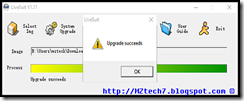 |
| LiveSuit application flashing successful - image by MZtech |
Did this solution helped you? Please let me know by providing your feedback below. If you find this post helpful, dont forget to hit like or share buttons.

I think ZenFone 3 Deluxe ZS570KL will represent the future bang in bucks smartphone
Asus ZenFone 3 Deluxe (ZS570KL) smartphone was launched in May 2016. The phone comes with a 5.70-inch touchscreen display with a resolution of 1080 pixels by 1920 pixels
The Asus ZenFone 3 Deluxe (ZS570KL) is powered by quad-core Qualcomm Snapdragon 820 processor and it comes with 6GB of RAM. The phone packs 64GB/256GB of internal storage that can be expanded up to 246GB via a microSD card. As far as the cameras are concerned, the Asus ZenFone 3 Deluxe (ZS570KL) packs a 23-megapixel primary camera on the rear and a 8-megapixel front shooter for selfies.

The Asus ZenFone 3 Deluxe (ZS570KL) runs Android and is powered by a 3000mAh non removable battery.
The Asus ZenFone 3 Deluxe (ZS570KL) is a dual SIM (GSM and GSM) smartphone Connectivity options include Wi-Fi, GPS, Bluetooth, FM, 3G, 4G (with support for Band 40 used by some LTE networks in India). Sensors on the phone include Proximity sensor, Ambient light sensor, Accelerometer, and Gyroscope.
About Asus
ASUSTeK Computer Inc., known as ASUS, is a Taiwanese multinational computer hardware and electronics company was founded in 1989 in Taiwan. ASUS is one of the worlds largest computer hardware companies. Its products include desktops, PC peripherals, laptops, smartphones, tablets and hybrid devices. The company has made Android phones powered by Intel and Qualcomm SoCs.
ZenFone 3 Deluxe (ZS570KL) Quick Specs
With Powerful storage and memory technology, I think local smarthphone maker could catch up with a lot of source low cause technology. Probably ZenFone 3 Deluxe will be the future mid range smartphone of the future. Im saying like yesterday you have Pentium 4 Desktop/Laptop , and now your have i7. Who knows tomorrow we have Quantum Desktop/Laptop in our home. Now feature sensor like Gyro or Finger Print Scanner , we can find them among the Php 7,000 (7K) Mid ranges smartphone with up to 128GB Memory.
The Asus ZenFone 3 Deluxe (ZS570KL) is powered by quad-core Qualcomm Snapdragon 820 processor and it comes with 6GB of RAM. The phone packs 64GB/256GB of internal storage that can be expanded up to 246GB via a microSD card. As far as the cameras are concerned, the Asus ZenFone 3 Deluxe (ZS570KL) packs a 23-megapixel primary camera on the rear and a 8-megapixel front shooter for selfies.
The Asus ZenFone 3 Deluxe (ZS570KL) runs Android and is powered by a 3000mAh non removable battery.
The Asus ZenFone 3 Deluxe (ZS570KL) is a dual SIM (GSM and GSM) smartphone Connectivity options include Wi-Fi, GPS, Bluetooth, FM, 3G, 4G (with support for Band 40 used by some LTE networks in India). Sensors on the phone include Proximity sensor, Ambient light sensor, Accelerometer, and Gyroscope.
About Asus
ASUSTeK Computer Inc., known as ASUS, is a Taiwanese multinational computer hardware and electronics company was founded in 1989 in Taiwan. ASUS is one of the worlds largest computer hardware companies. Its products include desktops, PC peripherals, laptops, smartphones, tablets and hybrid devices. The company has made Android phones powered by Intel and Qualcomm SoCs.
ZenFone 3 Deluxe (ZS570KL) Quick Specs
- PROCESSOR: Qualcomm Snapdragon 820
- RAM/ MEMORY: 6GB RAM/ 256 GB Memory
- CAMERA: Rear- 23MP ASUS PixelMaster 3.0 Camera (Sony IMX318 Sensor); Front- 8MP, 85-degree wide view
- CAMERA FEATURES: 0.03 TriTech Autofocus; 4-axis photo OIS; 3-axis video EIS; Color correction sensor; Dual tone LED Flash
- CONSTRUCTION: Full aluminum alloy unibody with invisible antenna
- DISPLAY: 5.7-inch Super AMOLED FHD; 79% Screen-to-Body Ratio
- AUDIO: Hi-Res Audio; New 5 Magnet Speaker; NXP Smart AMP
- BATTERY: 3,000 mAh with QuickCharge 3.0
- COLORS: Titanium Gray; Glacier Silver; Sand Gold
With Powerful storage and memory technology, I think local smarthphone maker could catch up with a lot of source low cause technology. Probably ZenFone 3 Deluxe will be the future mid range smartphone of the future. Im saying like yesterday you have Pentium 4 Desktop/Laptop , and now your have i7. Who knows tomorrow we have Quantum Desktop/Laptop in our home. Now feature sensor like Gyro or Finger Print Scanner , we can find them among the Php 7,000 (7K) Mid ranges smartphone with up to 128GB Memory.
Morefine in Partnership with Tomrepair Authorized Oversea Repair Center

Dear all in the MOREFINE community, as we are working hard to produce better products, we are also trying our best to improve our after-sales service. “What can I do if the product is defective?” This might be one of the biggest concerns for our customers. And this is the problem we are trying to solve. Some of our customers suggest us to set up a dedicated repair store for local market. We heard you and now we think there’s a better answer for both of us.
We are proud to announce our partnership with Tomrepair, a reliable repair center with hundreds of experienced technicians and mechanics. This repair service is now available in UK, Russia, Spain and Germany. And we are looking forward to be able to offer the service in more countries to ensure all customer needs can be fulfilled.
We believe this will be one of the notable changes we made to provide better customer support. And we are always here, listening. Don’t hesitate to let us know how we could do better. We’ll keep gathering feedback from you and strive to improve our service.
How it works:
Warranty service is performed by MOREFINE authorized service centers, Tomrepair, subject to the terms and conditions provided in this Limited Warranty. Neither MOREFINE nor Tomrepair are responsible for the costs of shipping the product in claim to the service center and back to the end user. In the event of Product failure, the Customer should take the following actions to obtain the warranty service:
1.Contact MOREFINE to find out whether the Product is still under warranty. MOREFINE will provide the Customer with instructions regarding the process of submitting repairing requests and sending the defective Product. MOREFINE will cover the costs of material and labor required to restore the Product to fully functional condition if the defective Product is within the Warranty Period. Contact details of MOREFINE: contact@imorefine.com.
2.Before sending any unit for service, be sure to back up data and remove any confidential, proprietary, or personal information from the Product. MOREFINE and its authorized service centers are not responsible for the damage to or loss of any programs, data, or removable storage media due to any kind of incidental failure of the handset and also at the time of service.
Read the full Warranty Statement here:
MOREFINE
Limited Warranty Statement
Thank you for your interest in the products and services of MOREFINE. This limited warranty shall apply to all MOREFINE branded mobile phones released after MAX1 (including MAX1) that are listed on the official website: www.imorefine.com (the "Product"). MOREFINE warrants that the Product is at the time of its original purchase free of defects in materials and workmanship under regular uses defined in user manuals during the warranty period (“Limited Warranty”). This Limited Warranty is subject to the following terms and conditions:
1.The Warranty is given only to the original purchaser of the Product (the “Customer”). This Limited Warranty may not be sold-on, assigned, transferred or given to any subsequent purchaser or acquirer of the Product.
2.Unless otherwise agreed by the Customer, this Limited Warranty shall last for twelve (12) months from the date of original purchase for mobile devices (“Warranty Period”).
3.Throughout the Warranty Period, MOREFINE or its authorized service center /personal will, at their discretion, without any charges and subject to Clause 4 repair a defective Product.
4.The warranty shall not be applicable under the following circumstance:
a.Usage other than in accordance with the user manual, rough handing, ingression of exposure to any kind of liquid (water, sweat, beverages, oils etc.), exposure to extreme thermal or environmental conditions, corrosion, oxidation, unauthorized repairs, unauthorized spare parts usage, accidents, forces of nature, or other actions beyond the reasonable control of MOREFINE unless the defect was caused directly by defects in material or workmanship. The warranty will also not cover any physical damage to the surface of the handset including but not limited to cracks or scratches on the LCD or camera lens; or
b.Deterioration of the Product due to normal wear and tear; or
c.The Product IMEI number/serial number, the accessory date code, water indicator or the warranty seal has been removed, erased, defaced, altered or is illegible; or
d.The defect was caused by a defective function of the service provider cellular network or other system.
e.Any defects caused by the fact that the battery has been short-circuited or by the fact that the seals of the battery casing or the cells are broken or show evidence of tampering or by the fact that the battery has been used in equipment other than those for which it has been specified; or
f.The defect was caused by the fact that the Product was used with or connected to an accessory not approved or provided by MOREFINE or used in other than its intended use and where it can be shown by MOREFINE that such defect is not the fault of the Product itself.
5.Any claim under the warranty is subject to notification to MOREFINE or a MOREFINE authorized service center for the alleged defect within a reasonable time of its occurrence and in no event later than the expiry of the warranty period.
We are proud to announce our partnership with Tomrepair, a reliable repair center with hundreds of experienced technicians and mechanics. This repair service is now available in UK, Russia, Spain and Germany. And we are looking forward to be able to offer the service in more countries to ensure all customer needs can be fulfilled.
We believe this will be one of the notable changes we made to provide better customer support. And we are always here, listening. Don’t hesitate to let us know how we could do better. We’ll keep gathering feedback from you and strive to improve our service.
How it works:
Warranty service is performed by MOREFINE authorized service centers, Tomrepair, subject to the terms and conditions provided in this Limited Warranty. Neither MOREFINE nor Tomrepair are responsible for the costs of shipping the product in claim to the service center and back to the end user. In the event of Product failure, the Customer should take the following actions to obtain the warranty service:
1.Contact MOREFINE to find out whether the Product is still under warranty. MOREFINE will provide the Customer with instructions regarding the process of submitting repairing requests and sending the defective Product. MOREFINE will cover the costs of material and labor required to restore the Product to fully functional condition if the defective Product is within the Warranty Period. Contact details of MOREFINE: contact@imorefine.com.
2.Before sending any unit for service, be sure to back up data and remove any confidential, proprietary, or personal information from the Product. MOREFINE and its authorized service centers are not responsible for the damage to or loss of any programs, data, or removable storage media due to any kind of incidental failure of the handset and also at the time of service.
Read the full Warranty Statement here:
MOREFINE
Limited Warranty Statement
Thank you for your interest in the products and services of MOREFINE. This limited warranty shall apply to all MOREFINE branded mobile phones released after MAX1 (including MAX1) that are listed on the official website: www.imorefine.com (the "Product"). MOREFINE warrants that the Product is at the time of its original purchase free of defects in materials and workmanship under regular uses defined in user manuals during the warranty period (“Limited Warranty”). This Limited Warranty is subject to the following terms and conditions:
1.The Warranty is given only to the original purchaser of the Product (the “Customer”). This Limited Warranty may not be sold-on, assigned, transferred or given to any subsequent purchaser or acquirer of the Product.
2.Unless otherwise agreed by the Customer, this Limited Warranty shall last for twelve (12) months from the date of original purchase for mobile devices (“Warranty Period”).
3.Throughout the Warranty Period, MOREFINE or its authorized service center /personal will, at their discretion, without any charges and subject to Clause 4 repair a defective Product.
4.The warranty shall not be applicable under the following circumstance:
a.Usage other than in accordance with the user manual, rough handing, ingression of exposure to any kind of liquid (water, sweat, beverages, oils etc.), exposure to extreme thermal or environmental conditions, corrosion, oxidation, unauthorized repairs, unauthorized spare parts usage, accidents, forces of nature, or other actions beyond the reasonable control of MOREFINE unless the defect was caused directly by defects in material or workmanship. The warranty will also not cover any physical damage to the surface of the handset including but not limited to cracks or scratches on the LCD or camera lens; or
b.Deterioration of the Product due to normal wear and tear; or
c.The Product IMEI number/serial number, the accessory date code, water indicator or the warranty seal has been removed, erased, defaced, altered or is illegible; or
d.The defect was caused by a defective function of the service provider cellular network or other system.
e.Any defects caused by the fact that the battery has been short-circuited or by the fact that the seals of the battery casing or the cells are broken or show evidence of tampering or by the fact that the battery has been used in equipment other than those for which it has been specified; or
f.The defect was caused by the fact that the Product was used with or connected to an accessory not approved or provided by MOREFINE or used in other than its intended use and where it can be shown by MOREFINE that such defect is not the fault of the Product itself.
5.Any claim under the warranty is subject to notification to MOREFINE or a MOREFINE authorized service center for the alleged defect within a reasonable time of its occurrence and in no event later than the expiry of the warranty period.
Don’t miss any of our future video tutorials, follow us on Youtube. Like us on Facebook. Add us in your circles on Google+. Watch our photo albums on Flickr. Subscribe now to our newsletter. Biggest firmware download center.
How to Solve Insufficient Storage problem in Android
How to Get Rid of Insufficient storage Space Problem in android without root .

How to Fix Insufficient Storage Available error in Google playstore .
So in this guide to solve the insufficient storage available on this device we will use 5 simple methods .
Trick to buy xiaomi redmi note 3 from amazon flash sale .
So starting with the First Method .
Solve Insufficient storage available in this Device Problem By Clearing Cache :-
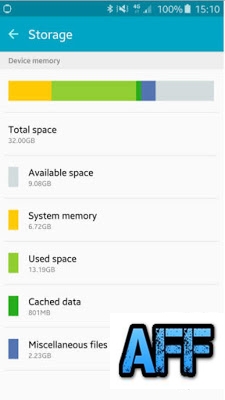 Now as in the above image you can see that there is a Cached data section of 801 mb which is basically useless . So here is How you can clear the cached Data and fix the no storage space available error .
Cached Data is temporary data stored by app developers . What the cached data do is whenever you open any website or app the cached files will be used instead of downloading again from servers .
Advantages :-
The cached data helps in loading the apps and some websites faster .
Disadvantages :-
As we mentioned earlier that the data is stored in your smartphone so it is obvious that it will take space on your smartphone . Sometimes the cached data size can reach upto 1.2gb in size .
It Freezes the smartphone while using some apps .
Makes down the smartphone slow .
So by clearing the cache you will be able to Solve the Insufficient storage available on this device problem .
Name and list of devices updating to android N 7.0 .
Fix insufficient storage available on this device Google playstore error .
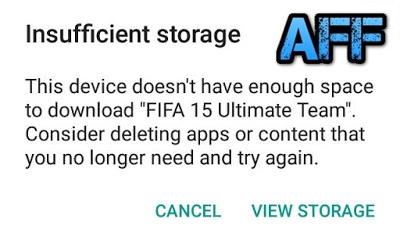 Method 2 to fix insufficient storage error :- Moving Apps to Sdcard .
By default android downloads the apps to Internal storage of smartphone and sometimes due to Many apps we get insufficient storage space error . There are many apps ( Not all ) you can move to Sd card and increase the Space in your internal storage .
Here is How yo can move apps to Sd card to Fix the insufficient storage available in this device error .
Do you get insufficient storage available error while downloading files from google playstore Or When you try to install a app or download a file you see the Less storage space available error on screen ? if yes then you are at right place . Today we are here with a guide on How to Fix Insufficient storage problem in android phone without root .
it happens many time when we want to download any app from Google Playstore and we get Less storage error . The problem of Insufficient storage mainly comes in smartphones like micromax,intex,Samsung,lava,karbonn,xolo and other old brands that doesnt come with features like space optimization . So today in this guide we will tell you How to Fix Insufficient storage problem in android smartphone without root .
How to Fix Insufficient Storage Available error in Google playstore .
So in this guide to solve the insufficient storage available on this device we will use 5 simple methods .
Trick to buy xiaomi redmi note 3 from amazon flash sale .
So starting with the First Method .
Solve Insufficient storage available in this Device Problem By Clearing Cache :-
- First of all Go to the Settings of your android smartphone .
- Now search for Storage settings .
- After going in the storage settings you will see a Option of Cached data , Simply press it . After pressing you will see that the Cached data is now reduced to 0 mb .
- So this was the first way to Solve the Insufficient storage problem in android .
Cached Data is temporary data stored by app developers . What the cached data do is whenever you open any website or app the cached files will be used instead of downloading again from servers .
Advantages :-
The cached data helps in loading the apps and some websites faster .
Disadvantages :-
As we mentioned earlier that the data is stored in your smartphone so it is obvious that it will take space on your smartphone . Sometimes the cached data size can reach upto 1.2gb in size .
It Freezes the smartphone while using some apps .
Makes down the smartphone slow .
So by clearing the cache you will be able to Solve the Insufficient storage available on this device problem .
Name and list of devices updating to android N 7.0 .
Fix insufficient storage available on this device Google playstore error .
By default android downloads the apps to Internal storage of smartphone and sometimes due to Many apps we get insufficient storage space error . There are many apps ( Not all ) you can move to Sd card and increase the Space in your internal storage .
Here is How yo can move apps to Sd card to Fix the insufficient storage available in this device error .
- Goto settings > applications > all .
- Now Open every app on by one .
- Whenever you will open a app you will see a Move To Sdcard option .
- However in some case you will see that the Move to Sdcard option is blurred which means the app cant be moved to sd card .
Method 3 to solve insufficient storage available error .
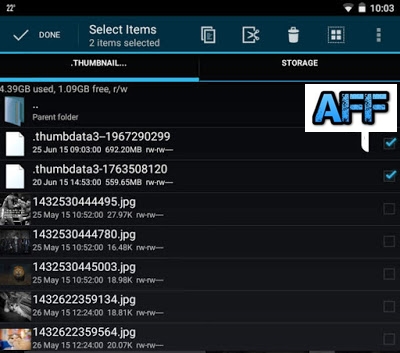
Sometimes the default apps in our android phone start making files itself and they are very big in size . The most common file which we find is the Thumbdata which is created by the gallery application of a android phone .
So here is How you can delete those unwanted apps and Fix Insufficient storage error in android .
- Go to your file explorer .
- Now search for .thumbnail file .
- After searching you will see many results .
- Now delete them one by one .
- After deleting you will see that you will bot receive Insufficient storage available error while downloading apps from google playstore .
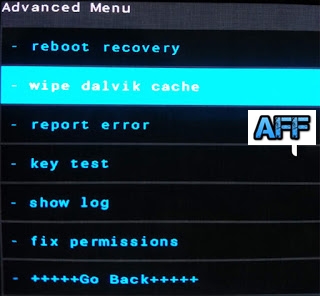
In the 1st method we told you to Clear cached data of apps and that is easy and can be done manually . But what about the System Cache ? So in this Method we will tell you to clear the system cache to solve the insufficient space error .
Here is How to clear dalvik cache to solve the Insufficient storage space error .
- First of all turn off your smartphone .
- After turning off boot the smartphone into cwm recovery .
- To boot into cwm recovery press Volume up + power button together .
- After booting into cwm recovery you will see many option .
- Choose Wipe Cache Partition .
- Then go to advanced settings and Choose wipe dalvik cache .
- After clearing cache go back to main screen and choose Reboot system now .
If still all of the above doesnt works the Try the Last and for Sure working method to Fix the Insufficient storage problem in android .
Method 5 .
In the 5th method we will tell you how to Reset your smartphone to get rid of the Insufficient storage available error .
Please remember that after resting your smartphone you will loose all your apps and files which includes the Images,contacts,songs and every file present on your android smartphone . So it is recommended to take a backup of your smartphone .
- First of all make a backup as mentioned earlier .
- Now go to settings of your smartphone .
- Now you will see a option of Backup/reset .
- Open it .
- And select the last option " Erase data on phone / Factory reset " .
- After selecting you will be asked to confirm resetting the phone .
- Choose Ok .
- The resetting process will be started .
- And after the Successfully Completion the smartphone will be rebooted .
So this was our guide on How to Fix insufficient storage available on this device error while downloading games from google playstore in android , i Hope this guide helped you in solving the Insufficient storage problem in android .
OUKITEL K4000 Pro Televised Interview in France

OUKITEL K4000 Pro, as OUKITEL’s first long battery smartphone in 2016, shocked the local TV program in France.
OUKITEL K4000 Pro wows the world again by its tougher screen from the local TV program, 4600mAb big battery smartphone with 1.1mm thickness tempered glass screen, ultra-strong to knock nails into wood, really beyond the usual resistance.
OUKITEL K4000 Pro specs:
OUKITEL K4000 Pro wows the world again by its tougher screen from the local TV program, 4600mAb big battery smartphone with 1.1mm thickness tempered glass screen, ultra-strong to knock nails into wood, really beyond the usual resistance.
OUKITEL K4000 Pro specs:

Don’t miss any of our future video tutorials, follow us on Youtube. Like us on Facebook. Add us in your circles on Google+. Watch our photo albums on Flickr. Subscribe now to our newsletter. Biggest firmware download center.
Will VKWorld F1 smartphone Regain Popularity in 2016

Will Small-Screen Phone Regain Popularity in 2016?
In 2011, Samsung launched the very first Galaxy Note which featured a striking 5.3-inch huge display. Since then, smartphone screens are becoming bigger and bigger. And even Apple whosticks to 3.5 and 4.0-inch screens released the 4.7-inch iPhone 6 and the even bigger 5.5-inch iPhone 6 Plus. Nowadays, most smartphone screens exceed 5 inches and some even reach 6 or 7 inches. However, after the release of iPhone 6s, there are endless rumors that Apple will again make a 4-inch iPhone in 2016, which reflects the need for small-screen phones. Sony already announcedtheir Xperia Compact line in 2013. And recently the Chinese manufacturer vkworld is also going to bring a 4.5-inch smartphone-vkworld F1. Why do they try to produce smaller phone which seems incompatible with today’s market?
Does smaller phone have advantages compared to bigger one?
Holding experience:
-Width under 7cm is the limit for most people to use a phone with one hand. And it is impossible to make a phone with 5.5-inch screen narrow down to 7cm. When you stand in a bus or have only one hand available, it would be hard to use your 5.5-inch phone with only one hand. But if you are using a smaller phone like iPhone 6s or vkworld F1, there will be no such problem.
Convenience:
-Smaller phone can fit better in pocket while bigger phone often exceed the limit of most pockets. And smaller phone is easier to carry around and weighs lighter.
Customer preference:
-After Apple released its 4.7-inch and 5.5-inch iPhone, Chitika made a comparison between these two new devices in terms of traffic rate in U.S. And surprisingly, iPhone 6 accounts for 2.3% while iPhone 6 Plus only 0.3%.
That means there are actually many people who prefer smaller phone. And the market need for smaller phone is still not neglectable.
Power consumption:
-Bigger screen will definitely cost more power than smaller screen. With same IPS display and same resolution and same battery capacity, a 4.5-inch screen saves more than 20% of battery power than a 5.5-inch one.
Most big screen phone has to increase resolution to maintain high pixel density, which also consumes more power. But small screen like 4.5 inches can stays at 720P and still keeps 326 ppi.
Above all, the market of small phone is not extinct. And small phone has more advantages than we may think. Now we don’t have many choices of small phone other than iPhone 5s, 6s, Xperia Compact and vkworld F1 mentioned before etc. But in 2016, if Apple releases the 4-inch iPhone, many companies would follow it and at that time we will have more choices. And the vkworld F1 might be the first one to rejoin the army of small-screen phone in 2016.
In 2011, Samsung launched the very first Galaxy Note which featured a striking 5.3-inch huge display. Since then, smartphone screens are becoming bigger and bigger. And even Apple whosticks to 3.5 and 4.0-inch screens released the 4.7-inch iPhone 6 and the even bigger 5.5-inch iPhone 6 Plus. Nowadays, most smartphone screens exceed 5 inches and some even reach 6 or 7 inches. However, after the release of iPhone 6s, there are endless rumors that Apple will again make a 4-inch iPhone in 2016, which reflects the need for small-screen phones. Sony already announcedtheir Xperia Compact line in 2013. And recently the Chinese manufacturer vkworld is also going to bring a 4.5-inch smartphone-vkworld F1. Why do they try to produce smaller phone which seems incompatible with today’s market?
Does smaller phone have advantages compared to bigger one?
Holding experience:
-Width under 7cm is the limit for most people to use a phone with one hand. And it is impossible to make a phone with 5.5-inch screen narrow down to 7cm. When you stand in a bus or have only one hand available, it would be hard to use your 5.5-inch phone with only one hand. But if you are using a smaller phone like iPhone 6s or vkworld F1, there will be no such problem.
Convenience:
-Smaller phone can fit better in pocket while bigger phone often exceed the limit of most pockets. And smaller phone is easier to carry around and weighs lighter.
Customer preference:
-After Apple released its 4.7-inch and 5.5-inch iPhone, Chitika made a comparison between these two new devices in terms of traffic rate in U.S. And surprisingly, iPhone 6 accounts for 2.3% while iPhone 6 Plus only 0.3%.
That means there are actually many people who prefer smaller phone. And the market need for smaller phone is still not neglectable.
Power consumption:
-Bigger screen will definitely cost more power than smaller screen. With same IPS display and same resolution and same battery capacity, a 4.5-inch screen saves more than 20% of battery power than a 5.5-inch one.
Most big screen phone has to increase resolution to maintain high pixel density, which also consumes more power. But small screen like 4.5 inches can stays at 720P and still keeps 326 ppi.
Above all, the market of small phone is not extinct. And small phone has more advantages than we may think. Now we don’t have many choices of small phone other than iPhone 5s, 6s, Xperia Compact and vkworld F1 mentioned before etc. But in 2016, if Apple releases the 4-inch iPhone, many companies would follow it and at that time we will have more choices. And the vkworld F1 might be the first one to rejoin the army of small-screen phone in 2016.


Don’t miss any of our future video tutorials, follow us on Youtube. Like us on Facebook. Add us in your circles on Google+. Watch our photo albums on Flickr. Subscribe now to our newsletter. Biggest firmware download center.
How to Use Print Screen Feature in Windows 7 8 8 1 10
Do You Know How To Use Print Screen On Your Windows Laptop?
I am certain that everyone who uses a computer knows what print screen is and its purpose. You could find Print Screen Key (PrntScr) on various type of computer keyboard. But even though almost everyone is familiar with this feature, very few are using it.
Print Screen Key - photo by MZtech "On my experience, when I tried to use this feature by pressing the PrntScr Key on the keyboard, I was expecting a prompt would pop up showing me the screen image and give me option whether to save or discard but then nothing showed up. I pressed it again, still nothing happened. I thought then maybe it was automatically saved in a folder somewhere so I started searching through my files but found nothing. I thought then my Print Screen Key doesn’t work. And since I need to capture my whole desktop window, I began searching for applications to download and install on my computer. Only to learn that I was wrong in thinking that my print screen key isn’t working. It actually works perfectly fine, I just don’t know how to use it and how it works."

How does Windows’ Print Screen feature works?
Windows 7/8/10:
1.) Press PrntScr Key
2.) Launch paint.exe application 

 |
| Save captured image in Paint application - image by MZtech |
4.) And you will see the image you captured and could choose whether to save, edit, or discard it.
WINDOWS 10:
Print Screen feature in Windows 10 is much more easier. All you have to do is press the Windows Key and Print Screen Key at the same time in your keyboard.
 |
| Windows and Print Screen Keys - image by MZtech |
 |
| Windows and Print Screen Keys on Keyboard - image by MZtech |
Your screen will blink for a second which signifies that it has captured image of your screen. The image captured is automatically saved inside Capture Folder in your Pictures.
It’s very simple, right? So you need not to download additional application for you to use. Aside from saving some space on your disk, you can avoid the risk of downloading application full of bloat ware, ad ware and worse malware.
You might also want to read on my post about Windows Snipping Tool. It is useful for capturing image of you screen but is more flexible to use because it has some more options.
 |
| What is Windows Snipping Tool And How Do We Use It? |
SOLVED Dell Black Screen 3 Beeps In Windows 10 Upgrade
Windows 10 Upgrade Killed My Dell Inspiron 3520
 |
| Windows 10 Killed My Dell Inspiron- Photo by MZtech |
After I upgraded to Windows 10, every thing worked fine at first. But after it installed a couple of updates, I restarted my PC and it wont boot up. The power light indicator lights up but no Logo screen or Bios. I turned it off and turned it on again, it is still on black screen and this time it is beeping with 3 beeps simultaneously.
3 beeps code on Dell Inspiron means system board failure. I dont believe it is a hardware failure because everything worked fine before the upgrade. It is surely a software issue.
The solution:
- Remove the battery and the AC adapter.
- Remove all the screws in the laptop.
- Press Power button for 30 seconds. (discharge static electricity in laptop)
- Open up laptop and remove CMOS battery for 10-30 minutes.
- Replace back CMOS battery and screws.
- Connect to AC adapter.
- Press Fn/F2/F8 simultaneously while pressing the power button.
- Repeat step 7 if Dell Logo Splash Screen doesnt appear after 10 seconds.
Inspiron 3520 has not been tested and verified by Dell to be compatible with Windows 10. It has driver compatibility issues in which the system cannot detect the boot drive so in pressing the any of the function keys mentioned earlier, it helps the system detect the boot drive so it could perform the POST and boot to Dell logo screen.
Quick TIP:
In resetting the CMOS battery, you need not to disassemble your laptop completely. After you removed the screw, lift the upper cover near the touch pad and you will see the CMOS battery.
Quick TIP:
In resetting the CMOS battery, you need not to disassemble your laptop completely. After you removed the screw, lift the upper cover near the touch pad and you will see the CMOS battery.
 |
| Dell Inspiron CMOS battery - photo by MZtech |
The solution above will only help you boot up back to Windows 10. But every time you shut down your laptop and turn in back on, you have to perform all over again step 7 and step 8.
If your current bios version is A09 and lower, updating your bios to A10 will solve the issue.
I would appreciate to hear a feedback from you guys if this solution worked for you. If you know some other solutions with this issue, you are welcome to share your idea. If you have questions or need more assistance, feel free to post a comment below.
Read Also:
Read Also:
 |
| Is Your Computer CompatibleWith Windows Upgrade? |
Oukitel will go to MWC in February
OUKITEL is going to the Mobile World Congress in February 2016. The booth No. is 7J73.

This is the first time that OUKITEL attend a worldwide congress. MWC is the world’s best opportunity for mobile industry networking. Its an opportunity for OUKITEL, also a challenge for OUKITEL. Though established only one year, OUKITEL has been developed very fast since its establishment.
During the last year, OUKITEL released 13 models including different entry level phone with cheap prices and middle level phones with reasonable price. Also in the last months, OUKITEL has confirmed its direction in big battery and long time standby smartphones. For the MWC 2016, OUKITEL will bring the big battery series smartphones with no doubt. More than this, OUKITEL will bring some new models that we will release for the first half 2016.
Stay tuned for more on OUKITEL Official Facebook Page: www.facebook.com/oukitelmobile
Don’t miss any of our future video tutorials, follow us on Youtube. Like us on Facebook. Add us in your circles on Google+. Watch our photo albums on Flickr. Subscribe now to our newsletter. Biggest firmware download center.
How To Install Android Games and Apps In Your Pc
Play Your Favorite Android Game On PC
 |
| Droid4x Screenshot - photo by Mztech |
Installing Android applications and games in your PC is possible. You will be able to play your favorite Android games on a bigger screen and can even use your computer's mouse for easier navigation and controls.
All you have to do is download an Android emulator application, install it in your PC, and run the application. You will be asked to log-in Gmail account so you could access the Play Store and start downloading your desired applications.
Thursday, July 14, 2016
The future of computing may lie in DNA
While scientists study the possibilities of storing data in DNA, the web magazine Engadget reports that another group of researchers looking into the possibility of utilizing living cells for next-generation computing.
The latest studies have developed a method of integrating both analog and digital computing into gene-based circuits. This allowed researchers to convert analog chemical reactions into binary output, or the ones and zeros that regular computers understand.
 One day silicon-based computing may be a thing of the past and organic computers will be the norm.
Apart from the obvious applications on general computing, gene-based circuitry can also be helpful to the medical field where it can be programmed to treat various diseases. In fact, clinical trials have been scheduled to use gene circuitry to treat gut diseases within the year. Alfred Bayle
The latest studies have developed a method of integrating both analog and digital computing into gene-based circuits. This allowed researchers to convert analog chemical reactions into binary output, or the ones and zeros that regular computers understand.
Apart from the obvious applications on general computing, gene-based circuitry can also be helpful to the medical field where it can be programmed to treat various diseases. In fact, clinical trials have been scheduled to use gene circuitry to treat gut diseases within the year. Alfred Bayle
Elephone Explorer Pro first sport camera with voice broadcast in the world

Explorer Pro the first sports camera with voice broadcast in the world.Featured with 4k,waterproof and NT96660 chip. It will be launched in the next month. Now Explorer is available here.
Action Camera, LeFun™ ELE CAM 4K WiFi Waterproof Sports Camera 2.0-inch HD 16MP 1080P with Free Accessories Kit
- Wireless controls, share wonderful moments at any time,With built-in WIFI, you can connect it to the APP in your phone.
- High color rendition,16MP for fine capturing dynamic,1080p FHD video recording and image freeze-frame at 60 frames per second bring you clear and vivid quality
- 2.0-inch HD color screen with highest video resolution, The camera which can take high resolution and high frame rate video as well as has many powerful functions.
- 170° HD visual wide angle, With 170° wide angle which ensures excellent shoot vision and retains more realistic scene, it captures immersive wide-angle view.
- Built-In WiFi + Bluetooth: Delivers enhanced connectivity to the GoPro App, Smart Remote
- High color rendition,16MP for fine capturing dynamic,1080p FHD video recording and image freeze-frame at 60 frames per second bring you clear and vivid quality
- 2.0-inch HD color screen with highest video resolution, The camera which can take high resolution and high frame rate video as well as has many powerful functions.
- 170° HD visual wide angle, With 170° wide angle which ensures excellent shoot vision and retains more realistic scene, it captures immersive wide-angle view.
- Built-In WiFi + Bluetooth: Delivers enhanced connectivity to the GoPro App, Smart Remote
Specifications
Special Function:4K(3840*2160)15fps,1080p(60fps),720P(120fp)s, waterproof depth: 30 meters
Primary Information: Wide Angle: 170 degree wide angle
Storage: Micro SDHC(up to 64GB)
Screen Size: 2.0 inch
Screen Type: TFT LCD?960*240?
Charing Time : about 2hours
Working Time:1080P/about 2hours
Video Compression: H.264
Video Resolution : 4K(3840*2160)15fps, 2.7K(2688*1520)30fps, 1080P(1920 x1080)60fps/30fps,720P(1280*720) 120fps/60fps/30fps
Video Frame Rate: 30fps, 60fps
Video Output: HDMI
Image Format : JPEG
Image Resolution:16M/14M/12M/10M/8M/5M
Digital Zoom: 4X
Audio System: Built-in microphone/speacker (AAC)
Interface Type: USB2.0, HDMI
Input Interface: Mini USB
Output Interface: Mini HDMI , Mini USB
What you will get
1 x WiFi Camera
1 x Waterproof cover
1 x 3M Adhesive Tapes
1 x Cleaning cloth
1 x bandages
1 x Bicycle stand
2 x Accesoory Seat
1 x Steel Rope
1 x Ribbon
1 x Fixing Base
1 x USB Data Cable
1 x Helmet Seats
1 x Adaptor
2 x Adaptor stand
1 x User Manual
Don’t miss any of our future video tutorials, follow us on Youtube. Like us on Facebook. Add us in your circles on Google+. Watch our photo albums on Flickr. Subscribe now to our newsletter.
Tronsmart selected to attend the 2016 Global Sources Electronics in Hong Kong

Tronsmart is proud to announce that we will be attending the 2016 Global Sources Electronics trade show in Hong Kong from April 11th-14th. In the trade show, Tronsmart will exhibit our latest charging technology, which is currently one of the most advanced in the world. Among the offerings will be Tronsmart products featuring Qualcomm Quick Charge 3.0 technology, Type-C port devices, and items using Smart VoltIQ as well as our full lineup of car, wall, and desktop chargers.
The Global Sources Electronics trade show is one of the largest electronic sourcing trade shows in the world and also one of the longest running, going back more than 10 years. The trade fair will be hosted at the Asia-world Expo Hong Kong from April 11th to 30th, and split into 4 time periods. These four periods include: home electronics, office, automobile, smart devices, etc. Tronsmart will be attending the first themed exhibition offering home, office, and vehicle-mounted electronic solutions.
Tronsmart is one of the world’s leading smart device charging brands and an official OEM vendor of Qualcomm Quick Charge 2.0 & 3.0 products. Partnering with Qualcomm, you can visit their website directly to view more than 10 of Tronsmart’s current lineup of chargers models. Each product is individually certified on the official Qualcomm Quick Charge device list, ranking among the top 3 Quick Charge accessory brands in the market.
Recently Tronsmart released the world’s most powerful five-port desktop charger, the Tronsmart Titan. Titan was recently reviewed by the well-regarded tech media site, PC Advisor and earned top marks while being given a rating of, “Highly Recommended”. Tronsmart also recently unveiled our cutting edge Type-C port Quick Charge 3.0 chargers for the latest generation of LG G5 and Xiaomi Mi5 smartphones.
Tronsmart sincerely welcomes all guests to visit the 2016 Global Sources Electronics and have a chance to meet with us face-to-face. We value the opportunity to discuss the future of our products and how they can offer more to each and every customer. We’d like to establish partnerships with the guests, vendors, and distributors from all over the world and we look forward to seeing you there!
Tronsmart Booth Information
Time: April 11th-14th
Location: Asia-world Expo Hong Kong
Booth No.: 3C27
Event: 2016 Global Sources Electronics
Location: Asia-world Expo Hong Kong
Booth No.: 3C27
Event: 2016 Global Sources Electronics
Don’t miss any of our future video tutorials, follow us on Youtube. Like us on Facebook. Add us in your circles on Google+. Watch our photo albums on Flickr. Subscribe now to our newsletter.
Teclast launches Tbook line of 2 in 1 tablets and X3 Pro Powered by Skylake CPU
Chinese company Teclast has just unveiled seven new convertible tablets, X3 Pro powered by the Skylake family, the rest powered by Intel AtomX5 processors, and all powered by Windows 10. These new portables have screen sizes ranging between 10.1 and 12.2 inches and all come with detachable keyboards.
These are the model names and screen sizes:
These are the model names and screen sizes:


All the new Tbook tablets are apparently identical - Intel Atom X5 Z8300 SoC, 4GB RAM, 64GB internal storage, 1,920 x 1,200 pixels touchscreen. Additional features include WiFi, Bluetooth, microSD slot, as well as micro HDMI out. The Tbook 16 has dual boot and comes in three variants, with the standard version featuring a keyboard cover, the 16s packing a Surface-style keyboard, while the 16 Pro has a more solid detachable keyboard, similar to a laptop.
The last new tablet, the most powerful one in all the new tablets, is Teclast X3 Pro. Powered by Intel Skylake Core M3-6Y30 CPU, frequency up to 2.2GHz, 8GB LPDDR3 RAM + 128GB SSD ROM. Detailed specs shown as the picture:

Don’t miss any of our future video tutorials, follow us on Youtube. Like us on Facebook. Add us in your circles on Google+. Watch our photo albums on Flickr. Subscribe now to our newsletter. Biggest firmware download center.
Subscribe to:
Posts (Atom)