
-- Download Stock ROM / Firmware : O+ 8.31z Android 4.2.2 (222MB) --
Showing posts with label 8. Show all posts
Showing posts with label 8. Show all posts
Friday, July 15, 2016
How to Use Print Screen Feature in Windows 7 8 8 1 10
Do You Know How To Use Print Screen On Your Windows Laptop?
I am certain that everyone who uses a computer knows what print screen is and its purpose. You could find Print Screen Key (PrntScr) on various type of computer keyboard. But even though almost everyone is familiar with this feature, very few are using it.
Print Screen Key - photo by MZtech "On my experience, when I tried to use this feature by pressing the PrntScr Key on the keyboard, I was expecting a prompt would pop up showing me the screen image and give me option whether to save or discard but then nothing showed up. I pressed it again, still nothing happened. I thought then maybe it was automatically saved in a folder somewhere so I started searching through my files but found nothing. I thought then my Print Screen Key doesn’t work. And since I need to capture my whole desktop window, I began searching for applications to download and install on my computer. Only to learn that I was wrong in thinking that my print screen key isn’t working. It actually works perfectly fine, I just don’t know how to use it and how it works."
How does Windows’ Print Screen feature works?
Windows 7/8/10:
1.) Press PrntScr Key
2.) Launch paint.exe application 

 |
| Save captured image in Paint application - image by MZtech |
4.) And you will see the image you captured and could choose whether to save, edit, or discard it.
WINDOWS 10:
Print Screen feature in Windows 10 is much more easier. All you have to do is press the Windows Key and Print Screen Key at the same time in your keyboard.
 |
| Windows and Print Screen Keys - image by MZtech |
 |
| Windows and Print Screen Keys on Keyboard - image by MZtech |
Your screen will blink for a second which signifies that it has captured image of your screen. The image captured is automatically saved inside Capture Folder in your Pictures.
It’s very simple, right? So you need not to download additional application for you to use. Aside from saving some space on your disk, you can avoid the risk of downloading application full of bloat ware, ad ware and worse malware.
You might also want to read on my post about Windows Snipping Tool. It is useful for capturing image of you screen but is more flexible to use because it has some more options.
 |
| What is Windows Snipping Tool And How Do We Use It? |

How to Hard Reset Factory Reset Acer Iconia One 8 B1 820
Acer Iconia One 8 B1-820 is the best tablet in the new world. Because ?This tablet computer display is high quality with this battery performance is good. And this latest tablet’s has huge popularity in time. So most user search this phone in all search engine. This tab computer uses new and latest android OS version. This tablet device Wi-Fi is very strong. When you to buy this tablet device. You must have to know how to do hard reset/factory reset. For your kind information, when you do hard reset your tablet device, you must backup your all data because after hard reset you lost you’re all valuable data from internal memory. Here we provide you data backup service. Every new post we try to provide you best brand tablet device hard reset solution.
Here some Specifications of Acer Iconia One 8 B1-820: Non-removable Li-Ion 4550 mAh battery (17.2 Wh), No network supported, No supported, Quad-core 1.33 GHz processor, IPS LCD capacitive touchscreen, RAM 1 GB, internal memory 16/32 GB, Expandable memory up to 32 GB, 8.0? display, weight 355 g, Back camera 5 MP, Front camera VGA, camera pixels 2592 x 1944, autofocus, LED flash, Bluetooth v4.0, Wi-Fi 802.11 b/g/n, Android OS, v5.0 (Lollipop), Accelerometer sensors, FM Radio no, HTML5 Browser, USB supported, microUSB V2.0. If you forgotten your phone pattern lock, user code, google lock or phone code. Now I show you how to do Acer Iconia One 8 B1-820 hard reset.
?Related article: How to Hard Reset/ Factory Reset Lava Iris Fuel F1 Mini
Hard Reset steps :-
Step 1 : First turn off your Acer tablet device.
Step 2 : Release any SIM card and SD card on your smartphone.
Step 3 : Press and Hold Vol+ key and Power key 10 seconds.

Step 4: When you see the android logo in your mobile screen release only Vol- key.
?Related article: How to Hard Reset/ Factory Reset Acer Liquid Z330
Step 5: After some time you got recovery mode Use Vol – key select Clear eMMC and press Power key to confirm. (Notice: when you select “Clear eMMC” and press “Power key” you lost your phone all user data)
Step 6: Now your tablet device will reboot.
Step 7: Your Android tablet device is now OK!!
?Related article: How to Hard Reset/ Factory Reset Wiko Rainbow Jam
?Related article: How to Hard Reset/ Factory Reset Wiko Rainbow Jam
Factory resets steps:-
Step1: First Turn on your Acer tablet device.
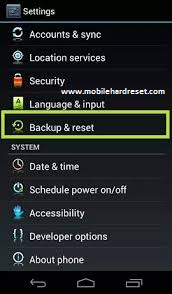
Step 2: Touch and Press Menu Button Go To Setting Menu >> Scroll and select Backup & reset >> Factory data reset >> Reset phone >> Erase everything. After factory reset, your tablet device will reboot.
?Related article: How to Hard Reset/Factory Reset Gionee S5.1 Pro
EZCast for Android reaches 1 8 694 version See here whats new and download it from here!

EZCast for Android reaches 1.8.694 version. You can download it from here, here or here (30 MB). See details about previous version v1.7.684 here.
EZCast APP for Android version, developed by WinnerWave, displays and exchange your multimedia from your Android embedded smartphone and pad wirelessly via EZCast devices or platforms. Supports photo display, document presentation, web browsing, camera mirroring, music and video streaming.
Android v1.8.694 update note (2016-01-04)
1. Mirror to Android/iOS/Windows/Mac devices2. Support iOS9 Airplay receiver
3. Support Chromecast Audio
4. Fix Android 6.0 compatibility issues
5. Add audio control buttons
Everything you want to know about EZCast previous versions youll find here.

Don’t miss any of our future video tutorials, follow us on Youtube. Like us on Facebook. Add us in your circles on Google+. Watch our photo albums on Flickr. Subscribe now to our newsletter. Biggest firmware download center.
OPlus O 8 31z Stock ROM Firmware
Download O Plus (O+) 8.31z Stock ROM / Firmware
 |
| O+ Oplus 8.31z Mobile Photo by MZtech |
O Plus 8.31 z Specifications:
- Display: 3.5" 320 x 480 (HVGA) capacitive touchscreen LCD TFT
- Processor: 1 GHz Dual Core ARM Cortex A7-based MediaTek MT6577
- Network: Dual SIM, 3G, HSDPA, HSUPA, Wi-Fi 802.11 b/g/n , Wi-Fi Hotspot, Bluetooth
- O.S.: Android 4.2.2 Jelly Bean
- Camera: Dual Camera with LED Flash, 3.2 MP back, 0.3 MP front
- Stereo FM Radio, 3.5 mm Audio Jack
- 256 MB RAM ; 256 MB ROM
- 1,500 mAh (milliampere-hour) Li-Ion battery
How to Hard Reset O+ 8.31z:
- Turn off your phone.
- Press Power button and Volume Up button to enter recovery mode.
- If you see an android picture but no menu options, press power key to activate recover menu.
- Press volume down to navigate through the menu list.
- Press volume up to select Wipe Data/ factory reset
- Press volume down to highlight Yes and press volume up to select.
- After the reset process is done, select reboot phone by pressing volume up.
If Hard Reset didn’t fix your phone, then you have to flash it with its stock firmware / stock ROM to revive it back to its original factory state.
Things you will need to flash O+ 8.31z:
- O+ 8.31z Stock ROM / Stock Firmware - get this by clicking the download link below.
- Flashing Tool - use SP Flash Tool to flash this phone. Download the tool by clicking on the download link below.
Download SP Flash Tool
Download Universal ADB Driver
Note: Click SKIP button on the upper right page after viewing ad for 5 seconds.O+ 8.31z Stock ROM / Stock Firmware is hard to find so I decided to share it to anyone who might be needing this. I hope it could help you in fixing your phone.
If you have any questions or suggestions, feel free to post your comment below and if you find this post helpful, please don’t forget to click on like or share buttons.
Download latest Xiaomi Mi Home Android application v 3 4 8

Download latest Xiaomi Mi Home Android application v.3.4.8 from here, here or here. (9.7 MB) Download previous version from here.
Tip: to use the application in English, make sure that your device system language is English. If not, the application will start in Chinese.

Don’t miss any of our future video tutorials, follow us on Youtube. Like us on Facebook. Add us in your circles on Google+. Watch our photo albums on Flickr. Subscribe now to our newsletter.
EZCast for Windows reaches 1 8 0 0 version Download it now from here!

Download EZCast for Windows v1.8.0.0 from here, here or here. (64 MB) Download previous version v1.7.0.3 from here.
Release Note:
1. Mirror to Android/iOS/Windows/Mac devices
2. Support iOS9 Airplay
3. Fix Windows 10 compatibility issues
1. ??APP?????OS?EZCast APP
2. ??iOS9 airplay
3. ??Windows10????

EZCast application for Windows version, developed by WinnerWave, displays your Windows embedded PC and Notebook wirelessly via EZCast devices or platforms.
Requirements: Windows 7, Windows 8/8.1.
Supports Extension and Mirror with audio transmission.
Supports music and video streaming.
Do not support Windows starter version.
My Tronsmart T1000 also got an OTA firmware update, from version 14180000 to 14583000 version.To manually upgrade EZCast firmware on Tronsmart T1000 to 11468 version read this article. Download the latest version of EZCast applications from here.


Everything you want to know about EZCast previous versions youll find here.
Don’t miss any of our future video tutorials, follow us on Youtube. Like us on Facebook. Add us in your circles on Google+. Watch our photo albums on Flickr. Subscribe now to our newsletter. Biggest firmware download center.
EZCast for Android reaches 1 8 717 version See whats new and download it from here!
EZCast for Android reaches 1.8.717 version. You can download it from here, here or here (30 MB). See details about previous version v1.8.701 from here.
EZCast APP for Android version, developed by WinnerWave, displays and exchange your multimedia from your Android embedded smartphone and pad wirelessly via EZCast devices or platforms. Supports photo display, document presentation, web browsing, camera mirroring, music and video streaming.
Android v1.8.717 update note (2016-01-15)
1. Mirror to Android/iOS/Windows/Mac devices2. Support iOS9 Airplay receiver
3. Support Chromecast Audio
4. Fix Android 6.0 compatibility issues
5. Add audio control buttons
6. Fix bugs
Everything you want to know about EZCast previous versions youll find here.

Don’t miss any of our future video tutorials, follow us on Youtube. Like us on Facebook. Add us in your circles on Google+. Watch our photo albums on Flickr. Subscribe now to our newsletter. Biggest firmware download center.
Thursday, July 14, 2016
EZCast for Android reaches 1 8 701 version See here whats new and download it from here!
EZCast for Android reaches 1.8.701 version. You can download it from here, here or here (30 MB). See details about previous version v1.8.694 here.
EZCast APP for Android version, developed by WinnerWave, displays and exchange your multimedia from your Android embedded smartphone and pad wirelessly via EZCast devices or platforms. Supports photo display, document presentation, web browsing, camera mirroring, music and video streaming.
Android v1.8.701 update note (2016-01-05)
1. Mirror to Android/iOS/Windows/Mac devices2. Support iOS9 Airplay receiver
3. Support Chromecast Audio
4. Fix Android 6.0 compatibility issues
5. Add audio control buttons
Everything you want to know about EZCast previous versions youll find here.

Don’t miss any of our future video tutorials, follow us on Youtube. Like us on Facebook. Add us in your circles on Google+. Watch our photo albums on Flickr. Subscribe now to our newsletter. Biggest firmware download center.
Subscribe to:
Posts (Atom)