Showing posts with label 10. Show all posts

Friday, July 15, 2016

S COLOR SV 10 Flash File


Download Here

Get

Is Your Computer Compatible for Windows 10 Upgrade 


How to Manually Verify If Your Computer is Compatible To Upgrade to Windows 10

PC Windows 10 Upgrade
Windows 10 Upgrade - image by MZtech

Before we all get too excited with Microsofts great offer of upgrading to Windows 10 for free, it would be better that we check first if our computer is compatible and will run with no problems.


In doing so, we have to check on two things:

  1. Windows 10 System Requirements.
  2. Computer Manufacturers Website.
  3. Windows 10 upgrade tool scans and checks our computer if our system is compatible before it downloads the upgrade.

How does it work?

When you click on the Windows icon that appeared on your taskbar, you will see an option to reserve your upgrade. After clicking reserve, you will see an option "Scan your PC". It will then check if your computer is compatible for the upgrade by checking if your system meets the requirements.

Windows 10 Upgrade System Requirements


After verifying that your computer have met the Windows 10 System Requirements, we need to check with our Computers Manufacturer if it says that your specific computer model have been tested and verified eligible for the upgrade.

Why do we have to verify with the Manufacturerand how do we do that?

The Windows upgrade tools shows that our PC is compatible for the upgrade, so why do we have to bother checking with the Manufacturer? As you notice with the Windows 10 system requirements, it is similar with Windows 7 system requirements. So basically, any computer that can run Windows 7, is capable of running Windows 10 too but it is not an assurance that it can handle all Windows 10 features and will not encounter issues.

Commonly, the issues encountered by some computers after upgrading to Windows 10 is caused by driver problems. For example, display screen flickers after the upgrade. We would think something is wrong with our graphic card but actually it is just driver issues. Driver update compatible to Windows 10 isnt available yet. In that case, there are no other option but to roll back to the previous O.S.

The easiest way to verify regarding our drivers compatibility, is to check with our Computer Manufacturer Support Website. Check on the website for your computer model and see if it has been tested and verified eligible for the upgrade.

Drivers and updates for your specific computer model can be found on support and downloads section of your manufacturers website.

If you have questions, feel free to post a comment below.

Get

Unbelievable Monkey stolen a bundle of Rs 10 000 cash

Monkey enters into jewelry shop in Guntur, Andhra Pradesh, and jumped on a worker, who escaped the animals attack. The monkey then sauntered to the cash drawer only to take away a bundle of Rs.10,000 cash and then running away even as the other workers tried to catch him in vain.

Watch Here:


Get

Bluetimes New design for Intel Atom x5 Z8300 Mini PC Windows 10 Android Dual OS


Bluetimes has announced the new design for 64 bit Intel Z8300 Mini PC with VGA Output support 2.5" SATA HDD.

Specifications:
•SoC – Intel Atom x5-Z8300 “Cherry Trail” quad core processor @ 1.44 GHz (Burst/Turbo frequency: 1.84 GHz) with Intel Gen8 HD graphics @ 500 MHz
•System Memory – 2 GB RAM future can be aupto 4GB
•Storage – 32 GB eMMC + micro SD slot+support 2.5 sata SSD/HDDVideo Output – HDMI/VGA Audio I/O – HDMI, 3.5mm microphone jack
•Connectivity–10/100M Ethernet, 802.11 b/g/n Wi-Fi, and Bluetooth 4.0
•USB–3x USB 2.0 host ports, 1x USB 3.0 port
•Misc–Power button Power Supply – 5V/3A

Don’t miss any of our future video tutorials, follow us on Youtube. Like us on Facebook. Add us in your circles on Google+. Watch our photo albums on Flickr. Subscribe now to our newsletter. Biggest firmware download center.

Get

Download Windows 10 x64 Drivers for Chuwi Hi12 tablet


Download Windows 10 x64 Drivers for Chuwi Hi12 tablet from here, here or here (181 MB). Platform: Intel Atom x5-Z8300 Cherry Trail.


Chuwi Hi12 drivers archive Hi12 _X64 ?? content:
Audio, BM, BT, Camera, DPTF, GPIO, Graphics, G-SENSOR, I2C, ISH, MBI, PMIC, PSS, SPI, TP, TXEI, UART & WIFI.


Don’t miss any of our future video tutorials, follow us on Youtube. Like us on Facebook. Add us in your circles on Google+. Watch our photo albums on Flickr. Subscribe now to our newsletter.

Get

How to Use Print Screen Feature in Windows 7 8 8 1 10


Do You Know How To Use Print Screen On Your Windows Laptop?


I am certain that everyone who uses a computer knows what print screen is and its purpose. You could find Print Screen Key  (PrntScr) on various type of computer keyboard. But even though almost everyone is familiar with this feature, very few are using it.


Print Screen Key in Computer Keyboard
Print Screen Key - photo by MZtech


"On my experience, when I tried to use this feature by pressing the PrntScr Key on the keyboard, I was expecting a prompt would pop up showing me the screen image and give me option whether to save or discard but then nothing showed up. I pressed it again, still nothing happened. I thought then maybe it was automatically saved in a folder somewhere so I started searching through my files but found nothing. I thought then my Print Screen Key doesn’t work. And since I need to capture my whole desktop window, I began searching for applications to download and install on my computer. Only to learn that I was wrong in thinking that my print screen key isn’t working. It actually works perfectly fine, I just don’t know how to use it and how it works."

How does Windows’ Print Screen feature works?


Windows 7/8/10:


1.) Press PrntScr Key
2.) Launch paint.exe application    paint iconpaste icon
Paint Tool Screenshot
Save captured image in Paint application - image by MZtech
3.) Click on your paint application and press Ctrl and V keys on your keyboard or click on the paste icon in your paint application.
4.) And you will see the image you captured and could choose whether to save, edit, or discard it.


WINDOWS 10:


Print Screen feature in Windows 10 is much more easier. All you have to do is press the Windows Key and Print Screen Key at the same time in your keyboard.


Windows Print Screen Keys
Windows and Print Screen Keys - image by MZtech


Windows and Print Screen Keys on Keyboard
Windows and Print Screen Keys on Keyboard - image by MZtech


Your screen will blink for a second which signifies that it has captured image of your screen. The image captured is automatically saved inside Capture Folder in your Pictures.

It’s very simple, right? So you need not to download additional application for you to use. Aside from saving some space on your disk, you can avoid the risk of downloading application full of bloat ware, ad ware and worse malware.

You might also want to read on my post about Windows Snipping Tool. It is useful for capturing image of you screen but is more flexible to use because it has some more options.


What is Windows Snipping Tool 
And How Do We Use It?


Get

Download BIOS upgrade file for Cube iWork 10 Tablet


Download BIOS upgrade file for Cube iWork 10 Tablet from here, here or here. 

Archive name: Cube iwork10-BIOS / IWORK10-3BIOS
Archive size:  7,16 MB
File: Rom_8MB_Tablet_cube_20140116.bin  / Rom_8MB_Tablet_cube_20140116.bin / Rom_8MB_Tablet_CubeLogo4_OK_SecureBoot.bin / Rom_8MB_Tablet_CubeLogo3_OK.bin


Don’t miss any of our future video tutorials, follow us on Youtube. Like us on Facebook. Add us in your circles on Google+. Watch our photo albums on Flickr. Subscribe now to our newsletter.

Get

SOLVED Dell Black Screen 3 Beeps In Windows 10 Upgrade

Windows 10 Upgrade Killed My Dell Inspiron 3520

Dell Inspiron 3520

Windows 10 Killed My Dell Inspiron- Photo by MZtech


After I upgraded to Windows 10, every thing worked fine at first. But after it installed a couple of updates, I restarted my PC and it wont boot up. The power light indicator lights up but no Logo screen or Bios.  I turned it off and turned it on again, it is still on black screen and this time it is beeping with 3 beeps simultaneously.
3 beeps code on Dell Inspiron means system board failure. I dont believe it is a hardware failure because everything worked fine before the upgrade. It is surely a software issue.


The solution:

  1. Remove the battery and the AC adapter.
  2. Remove all the screws in the laptop.
  3. Press Power button for 30 seconds. (discharge static electricity in laptop)
  4. Open up laptop and remove CMOS battery for 10-30 minutes.
  5. Replace back CMOS battery and screws.
  6. Connect to AC adapter.
  7. Press Fn/F2/F8 simultaneously while pressing the power button.
  8. Repeat step 7 if Dell Logo Splash Screen doesnt appear after 10 seconds.
Inspiron 3520 has not been tested and verified by Dell to be compatible with Windows 10. It has driver compatibility issues in which the system cannot detect the boot drive so in pressing the any of the function keys mentioned earlier, it helps the system detect the boot drive so it could perform the POST and boot to Dell logo screen.

Quick TIP:
In resetting the CMOS battery, you need not to disassemble your laptop completely. After you removed the screw, lift the upper cover near the touch pad and you will see the CMOS battery.
CMOS Battery
Dell Inspiron CMOS battery - photo by MZtech

The solution above will only help you boot up back to Windows 10. But every time you shut down your laptop and turn in back on, you have to perform all over again step 7 and step 8.
If your current bios version is A09 and lower, updating your bios to A10 will solve the issue.

I would appreciate to hear a feedback from you guys if this solution worked for you. If you know some other solutions with this issue, you are welcome to share your idea. If you have questions or need more assistance, feel free to post a comment below.


Read Also:

Windows 10 Computer
Is Your Computer CompatibleWith Windows Upgrade?


Get

How To Download Windows 10 ISO File


How To Download And Save An ISO File Of Windows 10 Operating System


Windows 10 upgrade will automatically download in your computers Windows update as soon as you confirm your upgrade reservation in Windows upgrade tool. It will be automatically erase from your computer as soon as the upgrade is done. So if you would like to save a Windows 10 installer file in your PC for future use (clean install, re-install, upgrade other PC, etc.), you need to download an ISO file of Windows 10 on your PC.

Windows Media Creation Tool
Windows Media Creation Tool, Windows 10 Download - image by MZtech

Steps on How to download Windows 10 ISO file:

  • You need to download Windows Media Creation Tool. Download link is provided below.


  • After downloading the .exe file, run the application. On the selection "What do you want to do?", there are two choices: Upgrade this PC now and Create installation media for another PC. Select on the second option and click next.


Windows Media Creation Tool
Windows Media Creation Tool, select create installation
media for another PC - image by MZtech


Windows Media Creation Tool
Windows Media Creation Tool, select language,
edition, and architecture - image by MZtech
  • Select English for the Language. You have to choose which edition you would like to download. If you would upgrade Windows 7 Starter, Windows 7 Home Basic/Premium, then you have to download Windows 10 Home.
Windows 10 Home
Windows 10 Home N
Windows 10 Home Single Language
Windows 10 Pro
Windows 10 Pro N
 
 
On the architecture, you have to choose if it is for 32-bit (x86), 54-bit (x64), or both.
Windows Media Creation Tool
Windows Media Creation Tool, select file type - image by MZtech


  • You have to select what type of Windows 10 file you would like to download and click next.  
 
  • Choose where to save your file. You can rename it to easy identify your downloaded file then click save and next.
Windows Media Creation Tool
Windows Media Creation Tool, choose location where
to save download file - image by MZtech

  • Your Windows 10 .ISO file will start to download and it will take some time depending on your Internet speed. File size is approximately 2.5 GB-3.5 GB for single architecture and around 5.9 GB for dual architecture (combined x32-bit and x64-bit).
 
If you like my post and find it helpful, please hit like or share buttons. Have some questions? Feel free to post it on comments below and Id be willing to help you out.


Get

How to Hard Reset Factory Reset Acer Iconia Tab 10 A3 A30

Acer Iconia Tab 10 A3-A30 is  the best tablet in the new world. Because ?This tablet computer display is high quality with this battery performance is good. And this latest tablet’s has huge popularity in time. So most user search this phone in all search engine. This tab computer uses new and latest android OS version. This tablet device Wi-Fi is very strong. When you to buy this tablet device. You must have to know how to do hard reset/factory reset. For your kind information, when you do hard reset your tablet device, you must backup your all data because after hard reset you lost you’re all valuable data from internal memory. Here we provide you data backup service. Every new post we try to provide you best brand tablet device hard reset solution.

Here some Specifications of Acer Iconia Tab 10 A3-A30: Non-removable Li-Ion 5910 mAh battery (22 Wh), No network supported, No supported, Quad-core 1.33 GHz processor, LED-backlit IPS LCD capacitive touchscreen, 16M colors, RAM 2 GB, internal memory 16/32/64 GB, Expandable memory up to 128 GB, 10.1? display, weight 540 g, Back camera 5 MP, Front camera 2 MP, camera pixels 2592 x 1944, autofocus, LED flash, Bluetooth v4.0, Wi-Fi 802.11 a/b/g/n/AC, dual-band, hotspot, Android OS, v5.0 (Lollipop), Accelerometer sensors, FM Radio no, HTML5 Browser, USB supported, microUSB V2.0. If you forgotten your phone pattern lock, user code, google lock or phone code. Now I show you how to do Acer Iconia Tab 10 A3-A30 hard reset.

?Related article: How to Hard Reset/ Factory Reset Lava Iris Fuel F1 Mini

Hard Reset steps :-

Step 1 : First turn off your Acer tablet device.

Step 2 : Release any SIM card and SD card on your smartphone.

Step 3 : Press and Hold Vol+ key and Power key 10 seconds.

Step 4: When you see the android logo in your mobile screen release only Vol- key.

?Related article: How to Hard Reset/ Factory Reset Acer Liquid Z330

Step 5: After some time you got recovery mode Use Vol – key select Clear eMMC and press Power key to confirm. (Notice: when you select “Clear eMMC” and press “Power key” you lost your phone all user data)

Step 6: Now your tablet device will reboot.

Step 7: Your Android tablet device is now OK!!

?Related article: How to Hard Reset/ Factory Reset Wiko Rainbow Jam

Factory resets steps:-

Step1: First Turn on your Acer tablet device.


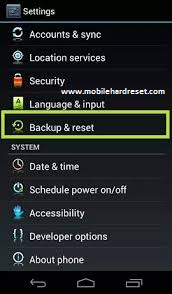
Step 2: Touch and Press Menu Button Go To Setting Menu >> Scroll and select Backup & reset >> Factory data reset >> Reset phone >> Erase everything.  After factory reset, your tablet device will reboot.

?Related article: How to Hard Reset/Factory Reset Gionee S5.1 Pro


Get

Thursday, July 14, 2016

Video Photo Gallery First Run of Rikomagic RKM MK36S Windows 10 Mini PC


The Rikomagic MK36S is a small form factor Windows PC powered by a quadcore Intel processor. Its low power requirements, fanless design and small form factor make it an ideal HTPC or desktop. The new Rikomagic RKM MK36 Mini PC is powered by Intel Atom X5-Z8300 Cherry trail Processor, it has 2GB of RAM and 32GB internal storage, plus 64GB via SD card. Here youll find the unboxing of this great device.

It came with Windows 10 Home 64bit edition, build 10240. This version is activated and everything is just ok. All the drivers are correctly installed and untill now everything runs just great. On the first run, there were 18.5 GB free on C: partition, from 28.6 GB (32 GB). The Intel Atom X5-Z8300 Cherry trail Processor is clocked at 1.44 GHz, according to Windows 10 OS.

Installed drivers for: Audio inputs and outputs, Batteries, Bluetooth, Computer, Disk drives, Display adapters, Firmware, Human Interface Devices, Imaging devices, Intel(R) Dynamic Platform and Thermal Framework, Keyboards, Mice and others pointing devices, Monitors, Network adapters, Ports (COM & LPT), Print queues, Processors, SD host adapters, Security devices, Software devices, Sound, video and game controllers, Storage controllers, System devices, Thread and Universal Serial Bus controllers.

You can download Rikomagic MK36S Windows 10 Drivers from here, here or here. (165 MB) Use the provided Double Driver application (as Admin) to simply restore the missing drivers from your collection, just locate the extracted folder.

Cool feature: THD Controller in Systray. 
High resolution photo album here. 
Stay close, we will be back with the review in the next days.

You can buy Rikomagic RKM MK36S Windows 10 Mini PC from Gearbest.com for only $122.15 with free shipping world wide. You can also buy it from Aliexpress.com.


About Rikomagic We were pioneers of the Android Mini PC concept and were the first Android Mini PC provider. Based in Shenzhen, China, Rikomagic aims to revolutionize the digital media player market. Our Research and Development team has extensive expertise in consumer electronics products and the development of network media players. Our core strength remains focussed around Android PCs and Android Mini PCs, where we have a great deal of experience. Rikomagic has been at the forefront of the development of multimedia, internet connected devices which truly transform TVs into home entertainment centers. The combination of our forward-looking market research, proven technological expertise and acumen, innovation, and our mature and efficient development process has given us industry-wide recognition. We differentiate ourselves by the quality, value and sophistication of our products. Our customers trust the RKM brand to enhance their entertainment experience, and we always strive to exceed their expectations.
 
Don’t miss any of our future video tutorials, follow us on Youtube. Like us on Facebook. Add us in your circles on Google+. Watch our photo albums on Flickr. Subscribe now to our newsletter. 

Get

Video Photo Gallery RKM MK36S Windows 10 Mini PC Bios Settings


The AMI BIOS of Rikomagic MK36S Mini PC is one of the most complete among those available on Windows Mini PCs. It really has dozens of options not available on other products. You will find also an Android section. Here youll find a Video & Photo Gallery with unboxing of RKM MK36S Mini PC and here is the first run of the device. High resolution photo album here.

If you need it, I have made a back-up og Rikomagic MK36S Windows 10 Mini PC. You caan download it from here, here or here. (2,82 MB).

I advise everyone to make a copy of a working BIOS, if possible, before doing BIOS experiments. To do that you can simple use the provided afuwin-5.05.04 software from the links above. If you disabled USB in the BIOS, or if you did another mess in device BIOS, only overwriting NVRAM can reset BIOS settings. In this way, there is no need to open the case, to teardown the device to be able to reset the CMOS. All the actions are made from Windows environment, so your Mini PC has to be able to boot into Windows. All the following actions that are you will do next are entirely at your own risk.
 

BIOS details 
Archive name: Rikomagic MK36S BIOS back-up
Archive size: 2,82 MB
Archive content:  afuwin-5.05.04 (afuwin32 & afuwin64) & afuwin.rom
BIOS Vendor: American Megatrends
Core version: 5.011
Compliancy: UEFI 2.4, PI 1.3
Project version: 1ARXP 0.38 X64
Build Date and Time: 11/12/2015 23:19:41   

For flashing NVRAM:  
1. Download the above archive. It is better to extract the content to the disk C.
2. Open as administrator Afuwingui.exe afuwin32AfuWin32Afuwingui.exe. 
3. Open original backuped bios. Uncheck default Main BIOS Image and check only NVRAM box. Press Flash. And best of all, start a command prompt as administrator and type, for example: C:AfuWin32afuwin.exe BIOS.rom /N
4. Press exit and restart the PC. After boot go into the BIOS and reset settings to default.

You can buy Rikomagic RKM MK36S Windows 10 Mini PC from Gearbest.com for only $122.15 with free shipping world wide. You can also buy it from Aliexpress.com. 
About Rikomagic We were pioneers of the Android Mini PC concept and were the first Android Mini PC provider. Based in Shenzhen, China, Rikomagic aims to revolutionize the digital media player market. Our Research and Development team has extensive expertise in consumer electronics products and the development of network media players. Our core strength remains focussed around Android PCs and Android Mini PCs, where we have a great deal of experience. Rikomagic has been at the forefront of the development of multimedia, internet connected devices which truly transform TVs into home entertainment centers. The combination of our forward-looking market research, proven technological expertise and acumen, innovation, and our mature and efficient development process has given us industry-wide recognition. We differentiate ourselves by the quality, value and sophistication of our products. Our customers trust the RKM brand to enhance their entertainment experience, and we always strive to exceed their expectations. 


Don’t miss any of our future video tutorials, follow us on Youtube. Like us on Facebook. Add us in your circles on Google+. Watch our photo albums on Flickr. Subscribe now to our newsletter.

Get

Video Photo Gallery Unboxing Rikomagic RKM MK36S Windows 10 Mini PC

http://www.rikomagic.com/en/product/showpro_id_76_pid_25.html

The RKM MK36S is Rikomagic’s second Windows Mini PC, after the first popular RKM MK36 model. Here youll find the main differences between the 2 models.

The new Rikomagic RKM MK36 TV Box cum Mini PC powered with Intel Atom X5-Z8300 Cherry trail Processor clocked at 1.84GHz and it supports up to 2GB RAM and Windows 10 64-Bit based Operating System. It has 2GB of RAM and 32GB of Disk space allows expansion up to 64GB via SD card. The main plus point of the Processor is the presence of Intel Gen 8 HD Graphics, helps to view movies and videos at a higher graphic quality, supports up to 2 Displays.

Military Design. That’s how I’d describe the Rikomagic MK36S design. With clean lines and angled faces, this looks almost sporty. I have to admit I’m a fan of its design. A dual material approach was taken for the case. The bulk of the case is plastic, with a top plate that features Rikomagic branding and a nice brushed metal texture. A metal bottom plate completes the case and is clearly used to help dissipate heat. The device feels durable and solid.

The connectivity is amazing: Dual Band WiFi, Bluetooth 4.0, 4 x USB ports (One is USB 3.0), RJ45 100Mbps LAN port, 3.5 mm earphone jack, MicroSD card slot and full sized HDMI out. It’s good to see it has Wireless AC, which means you can use the less crowded 5Ghz band which normally performs better than 2.4Ghz and doesn’t effect Bluetooth devices.


You can buy Rikomagic RKM MK36S Windows 10 Mini PC from Gearbest.com for only $122.15 with free shipping world wide. You can also buy it from Aliexpress.com.


Rikomagic RKM MK36S Windows 10 Mini PC Specifications
CPU: Intel Cherry Trail Z8300 1.84GHz 64bit 14nm
GPU: Intel Gen 8 Graphics 
OS: Windows 10 64bit
RAM: 2GB 

ROM: 32GB eMMC
Video output: HDMI 1.4

Bluetooth: 4.0
Wifi: Dual Band 2.4Ghz/5Ghz
Power: 12V/2A

Communication
Ethernet:  10/100M LAN RJ45 port
WIFI: 802.11 a/b/g/n/ac Dual Band
2.4Ghz/5Ghz
Bluetooth: 4.0

Ports 
3 x Standard USB 2.0
1 x USB 3.0
1 x DC-in Jack
1 x HDMI 1.40 A Type

1 x 3,5 mm earphone jack audio out
1 x
10/100M LAN RJ45 Ethernet port
1 x Micro SD card reader up to 64GB
1 x Power On/Off button
1 x Kensington lock port

Package content 

- 1 x TV Box
- 1 x HDMI Cable

- 1 x 12V/2A Power Adapter
- 1 x English User Manual


Photo gallery full album here.
About Rikomagic We were pioneers of the Android Mini PC concept and were the first Android Mini PC provider. Based in Shenzhen, China, Rikomagic aims to revolutionize the digital media player market. Our Research and Development team has extensive expertise in consumer electronics products and the development of network media players. Our core strength remains focussed around Android PCs and Android Mini PCs, where we have a great deal of experience. Rikomagic has been at the forefront of the development of multimedia, internet connected devices which truly transform TVs into home entertainment centers. The combination of our forward-looking market research, proven technological expertise and acumen, innovation, and our mature and efficient development process has given us industry-wide recognition. We differentiate ourselves by the quality, value and sophistication of our products. Our customers trust the RKM brand to enhance their entertainment experience, and we always strive to exceed their expectations.


Don’t miss any of our future video tutorials, follow us on Youtube. Like us on Facebook. Add us in your circles on Google+. Watch our photo albums on Flickr. Subscribe now to our newsletter. Biggest firmware download center.

Get