Download TZX-713B V2.1 firmware image (514.6 MB)
Showing posts with label tablet. Show all posts
Showing posts with label tablet. Show all posts
Friday, July 15, 2016
How to fix itechie A88 7 inch tablet stuck in boot logo
How to Fix iTechie A88 Android Tablet Computer unable to boot up and is stuck in boot logo.
 |
| iTechie A88 tablet stuck on boot logo - image by MZtech |
“I couldn’t determine exactly what caused my Android Tablet to stuck in boot logo every time I turn it on. I haven’t installed any update or flashed its firmware.”
 |
| iTechie A88 Tablet (Black) - image by MZtech |
Specifications:
- Model Name: iTechie A88
- Product Type: Wi-Fi Tablet Computer
- Screen Size: 7.0” ; 800 x 480 resolution ; 5-point capacitive touch screen
- Operating System: Android 4.2 Jelly Bean (upgradeable)
- Processor: AllWinner A13 1.0Ghz ARMv7
- RAM: 512MB
- Device Memory: 4.0 GB NAND Fast Flash
- Connectivity: Wi-Fi 802.11 b/g/n
- Camera: 0.3 MP front ; 2.0 MP back with flash
- Battery: 2000 mAh (milliampere-hour)
Hard Reset:
iTechie A88 recovery mode can be accessed by pressing altogether the power button, volume up (+) button and volume down (-) button. If you can access recovery options, all you have to do is select the reset to factory settings. It could fix “stuck in boot logo” issue.
Flashing Firmware:“I tried accessing recovery mode but it boots directly and stops at logo again. If you are unable to access the recovery mode like me, you need to flash the stock firmware image to the device in order to fix it.”
Things you’ll need:
- Firmware image file
- LiveSuit v1.11 application for your flashing tool.
To make sure you download the correct firmware version for your Android tablet, check on the motherboard number /build number. Unlock download link below.
 |
| iTechie A88 motherboard build number - image by MZtech |
How To Flash Firmware:
- Run LiveSuit application and click yes on whether or not to enter upgrade guide.
- Select General Upgrade Mode.
- Select Yes on Whether to select new image file.
- Browse and select the downloaded firmware image file.
- Make sure your tablet is off before connecting to PC.
- Connect tablet to Computer with USB (Universal Serial Bus) cord.
- Press and hold Power button and volume up (+) button.
- Release buttons once connection is detected by LiveSuit application.
- Flashing will start right away.
- Flashing will take a couple of minutes. Secure your USB connection to make sure your tablet doesn’t disconnect while flashing to avoid error.
- You will see a prompt if the flashing process finished successfully.
- You can now boot your tablet by turning it on. (Note: first boot after flashing may take a little longer than usual.)
- The default language is in Hindu. To change it to back to English, go to settings –> select Language & input (letter A icon) –> select the very first option in the selection on the right side –> scroll down to find English and select it. ( change also the input language of your keyboard).
 |
| LiveSuit application flashing firmware - image by MZtech |
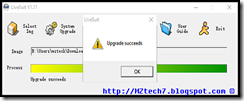 |
| LiveSuit application flashing successful - image by MZtech |
Did this solution helped you? Please let me know by providing your feedback below. If you find this post helpful, dont forget to hit like or share buttons.

Download latest Android KitKat 4 4 4 stock firmware for Chuwi Vi10 Pro Dual OS tablet

Download latest Android KitKat 4.4.4 stock firmware for Chuwi Vi10 Pro Dual OS tablet from here or from here. Download another Chuwi firmware from here.
Firmware details
Archive name: VI1064G??????????????221511xxxxxx????
Image: VI1064G¦ú-G¦µ+-+p-±-+++¦-+f+¦
Archive size: 577 MB
Model: Chuwi Vi10 Pro Dual OS tablet
Platform: IntelBay Trail Z3736F
Version: BYTC_IFWI_X64_R_MRDP1_7004_00_SecEnabled_EMMC
Version: BYTC_IFWI_X64_R_MRDP1_7004_00_SecEnabled_EMMC
Caution: Please do not update firmware unless you know what you are doing, you really want it or it is absolutely necessary. Firmware updates may occasionally have bad results, like bricking your device, temporarily or permanently. The firmware update process is done entirely at your own risk. Before attempting to update the firmware, back up your data.
Don’t miss any of our future video tutorials, follow us on Youtube. Like us on Facebook. Add us in your circles on Google+. Watch our photo albums on Flickr. Subscribe now to our newsletter.
Download Android KitKat 4 4 2 Stock Firmware for Vido T18 YuanDao T18 tablet

Download Android KitKat 4.4.2 Stock Firmware for Vido T18 / YuanDao T18 tablet AY model from here or here. For previous firmware go here. Download Android KitKat 4.4.2 Stock Firmware for Vido T18 / YuanDao T18 tablet DZ model from here or here.
Firmware details
Update file name: T18AY-4.4-20150925
Image: T18-4.4-20150925-AY / M80_240_1G_533_EMMC_20150925
Archive size: 480 MB
Model: Vido T18 / YuanDao T18 tablet AY model
Model: Vido T18 / YuanDao T18 tablet AY model
Config_version: V1.1.2
Platform: Mediatek MT8127
Project: joyasz27_tb_c_kk
Project: joyasz27_tb_c_kk
Caution: Please do not update firmware unless you know what you are doing, you really want it or it is absolutely necessary. Firmware updates may occasionally have bad results, like bricking your device, temporarily or permanently. The firmware update process is done entirely at your own risk. Before attempting to update the firmware, back up your data.
Don’t miss any of our future video tutorials, follow us on Youtube. Like us on Facebook. Add us in your circles on Google+. Watch our photo albums on Flickr. Subscribe now to our newsletter.
Download latest Android Lollipop 5 1 1 stock firmware for YonesToptech BT1077 tablet

Download latest Android Lollipop 5.1.1 stock firmware for YonesToptech BT1077 tablet from here or from here. Download previous firmware from here. Download Android KitKat 4.4.4 stock firmware for YonesToptech BT1077 tablet from here.
Firmware details
Archive? BT1077C96_ANDROID5.1_DDR408_20160106
Image: BT1077C96_ANDROID5.1_DDR408_20160106.img
Build number: bt1077c96_r3_408_n1_d1_20160106 / octopus_bt1077-eng 5.1.1 LMY48B 20150925 test-keys
FW version: v2.1rc3
Style: bt1077
Company: Allwinner
Pixels: 1024 x 600
Caution: Please do not update firmware unless you know what you are doing, you really want it or it is absolutely necessary. Firmware updates may occasionally have bad results, like bricking your device, temporarily or permanently. The firmware update process is done entirely at your own risk. Before attempting to update the firmware, back up your data.
Don’t miss any of our future video tutorials, follow us on Youtube. Like us on Facebook. Add us in your circles on Google+. Watch our photo albums on Flickr. Subscribe now to our newsletter.
Archive? BT1077C96_ANDROID5.1_DDR408_20160106
Image: BT1077C96_ANDROID5.1_DDR408_20160106.img
Model: YonesToptech BT1077 tablet
Firmware: Android Lollipop 5.1.1 stock
Archive size: 386 MB
Platform: Allwinner A83 octa-coreFirmware: Android Lollipop 5.1.1 stock
Archive size: 386 MB
Build number: bt1077c96_r3_408_n1_d1_20160106 / octopus_bt1077-eng 5.1.1 LMY48B 20150925 test-keys
FW version: v2.1rc3
Style: bt1077
Company: Allwinner
Pixels: 1024 x 600
Caution: Please do not update firmware unless you know what you are doing, you really want it or it is absolutely necessary. Firmware updates may occasionally have bad results, like bricking your device, temporarily or permanently. The firmware update process is done entirely at your own risk. Before attempting to update the firmware, back up your data.
Don’t miss any of our future video tutorials, follow us on Youtube. Like us on Facebook. Add us in your circles on Google+. Watch our photo albums on Flickr. Subscribe now to our newsletter.
Download Android Jelly Bean 4 2 2 stock firmware for Utok 700Q Lite tablet

Download Android Jelly Bean 4.2.2 stock firmware for Utok 700Q Lite tablet from here or from here. Download newer firmware versions from here.
Firmware details
Archive: M2_UTOK_700Qlite-20131224
Image: M2_UTOK_700Qlite-20131224.img
Archive size: 326 MB
FW version: V1.00
Style: 700QLite
Company: UTOK
Pixels: 800 x 480
FW version: V1.00
Style: 700QLite
Company: UTOK
Pixels: 800 x 480
Platform: Allwinner 31s
Build number: fiber_a31st-eng 4.2.2 JDQ39 20131224 test-keys
Caution: Please do not update firmware unless you know what you are doing, you really want it or it is absolutely necessary. Firmware updates may occasionally have bad results, like bricking your device, temporarily or permanently. The firmware update process is done entirely at your own risk. Before attempting to update the firmware, back up your data.
Don’t miss any of our future video tutorials, follow us on Youtube. Like us on Facebook. Add us in your circles on Google+. Watch our photo albums on Flickr. Subscribe now to our newsletter.
Build number: fiber_a31st-eng 4.2.2 JDQ39 20131224 test-keys
Caution: Please do not update firmware unless you know what you are doing, you really want it or it is absolutely necessary. Firmware updates may occasionally have bad results, like bricking your device, temporarily or permanently. The firmware update process is done entirely at your own risk. Before attempting to update the firmware, back up your data.
Don’t miss any of our future video tutorials, follow us on Youtube. Like us on Facebook. Add us in your circles on Google+. Watch our photo albums on Flickr. Subscribe now to our newsletter.
Download latest Android Lollipop 5 1 1 stock firmware for ExcelVan BT1077 tablet
Download latest Android Lollipop 5.1.1 stock firmware for ExcelVan BT1077 tablet from here or from here. Download previous firmware from here. Download Android KitKat 4.4.4 stock firmware for BT1077 tablet from here.
Firmware details
Archive? BT1077C96_Excelvan_ANDROID5.1_DDR408_20160315
Image: BT1077C96_Excelvan_ANDROID5.1_DDR408_20160315.img
Build number: bt1077c96_d1_n1_408_20160303 / octopus_bt1077-eng 5.1.1 LMY48B 20160122 test-keys
FW version: v2.1rc3
Style: bt1077
Company: Allwinner
Pixels: 1024 x 600
Caution: Please do not update firmware unless you know what you are doing, you really want it or it is absolutely necessary. Firmware updates may occasionally have bad results, like bricking your device, temporarily or permanently. The firmware update process is done entirely at your own risk. Before attempting to update the firmware, back up your data.
Don’t miss any of our future video tutorials, follow us on Youtube. Like us on Facebook. Add us in your circles on Google+. Watch our photo albums on Flickr. Subscribe now to our newsletter.
Archive? BT1077C96_Excelvan_ANDROID5.1_DDR408_20160315
Image: BT1077C96_Excelvan_ANDROID5.1_DDR408_20160315.img
Model: ExcelVan BT1077 tablet
Firmware: Android Lollipop 5.1.1 stock
Archive size: 395 MB
Platform: Allwinner A83 octa-coreFirmware: Android Lollipop 5.1.1 stock
Archive size: 395 MB
Build number: bt1077c96_d1_n1_408_20160303 / octopus_bt1077-eng 5.1.1 LMY48B 20160122 test-keys
FW version: v2.1rc3
Style: bt1077
Company: Allwinner
Pixels: 1024 x 600
Caution: Please do not update firmware unless you know what you are doing, you really want it or it is absolutely necessary. Firmware updates may occasionally have bad results, like bricking your device, temporarily or permanently. The firmware update process is done entirely at your own risk. Before attempting to update the firmware, back up your data.
Don’t miss any of our future video tutorials, follow us on Youtube. Like us on Facebook. Add us in your circles on Google+. Watch our photo albums on Flickr. Subscribe now to our newsletter.
Download Android KitKat 4 4 2 stock firmware for Onda V989 Octa Core Tablet

Download Android KitKat 4.4.2 stock firmware for Onda V989 Octa Core Tablet from here or here. Download Android Lollipop stock firmware for Onda V989 Octa Core Tablet from here. Download previous firmware from here. Download another Onda firmware from here.
Firmware details
Firmware? ???_A80T_AP6212 sun9iw1p1_p2_a80t_20160105
Image: +·¦~+-_A80T_AP6212 sun9iw1p1_p2_a80t_20160105.img.img
Model? Onda V989 Octa Core Tablet / UltraOcta A80 p2
Image file size: 373 MB
Platform: Allwinner A31s
Build number: kylin_p2-eng 4.4.2 KVT49L 20160105 test-keys
FW version: v1.3
Style: UltraOcta A80 P2
Company: Allwinner
Pixels: 1280 x 800
Caution: Please do not update firmware unless you know what you are doing, you really want it or it is absolutely necessary. Firmware updates may occasionally have bad results, like bricking your device, temporarily or permanently. The firmware update process is done entirely at your own risk. Before attempting to update the firmware, back up your data.
Don’t miss any of our future video tutorials, follow us on Youtube. Like us on Facebook. Add us in your circles on Google+. Watch our photo albums on Flickr. Subscribe now to our newsletter.
Don’t miss any of our future video tutorials, follow us on Youtube. Like us on Facebook. Add us in your circles on Google+. Watch our photo albums on Flickr. Subscribe now to our newsletter.
Download latest Android Lollipop 5 1 1 stock firmware for Wopad Q102A tablet
Download latest Android Lollipop 5.1.1 stock firmware for Wopad Q102A tablet from here or from here. Download previous firmware from here.
Firmware details
Archive? sun8iw6p1_android_bt1078_uart0-20160308
Image: sun8iw6p1_android_bt1078_uart0-20160308.img
Build number: bt1078bs_lp3_n1_d1_20160308 / octopus_bt1078-eng 5.1.1 LMY48B 20160308 test-keys
FW version: v2.1rc3
Style: Q102A
Company: Allwinner
Pixels: 1024 x 600
Caution: Please do not update firmware unless you know what you are doing, you really want it or it is absolutely necessary. Firmware updates may occasionally have bad results, like bricking your device, temporarily or permanently. The firmware update process is done entirely at your own risk. Before attempting to update the firmware, back up your data.
Don’t miss any of our future video tutorials, follow us on Youtube. Like us on Facebook. Add us in your circles on Google+. Watch our photo albums on Flickr. Subscribe now to our newsletter. Biggest firmware download center.
Archive? sun8iw6p1_android_bt1078_uart0-20160308
Image: sun8iw6p1_android_bt1078_uart0-20160308.img
Model: Wopad Q102A tablet
Firmware: Android Lollipop 5.5.1 stock
Archive size: 438 MB
Platform: Allwinner A83 octa-coreFirmware: Android Lollipop 5.5.1 stock
Archive size: 438 MB
Build number: bt1078bs_lp3_n1_d1_20160308 / octopus_bt1078-eng 5.1.1 LMY48B 20160308 test-keys
FW version: v2.1rc3
Style: Q102A
Company: Allwinner
Pixels: 1024 x 600
Caution: Please do not update firmware unless you know what you are doing, you really want it or it is absolutely necessary. Firmware updates may occasionally have bad results, like bricking your device, temporarily or permanently. The firmware update process is done entirely at your own risk. Before attempting to update the firmware, back up your data.
Don’t miss any of our future video tutorials, follow us on Youtube. Like us on Facebook. Add us in your circles on Google+. Watch our photo albums on Flickr. Subscribe now to our newsletter. Biggest firmware download center.
Download Android KitKat 4 4 2 Stock Firmware for Ainol AX10T tablet

Download Android KitKat 4.4.2 Stock Firmware for Ainol AX10T tablet from here or here. Download a newer firmware from here. Download another Ainol firmware from here.
Firmware details
Archive: S??_AX10T_MR1002H1CW1_vibrate_2014.9.16
Archive size: 440 MB
Image: S+ú¦-_AX10T_MR1002H1CW1_vibrate_2014.9.16
Image: S+ú¦-_AX10T_MR1002H1CW1_vibrate_2014.9.16
Platform: Mediatek MT6582
Project: mr900
Caution: Please do not update firmware unless you know what you are doing, you really want it or it is absolutely necessary. Firmware updates may occasionally have bad results, like bricking your device, temporarily or permanently. The firmware update process is done entirely at your own risk. Before attempting to update the firmware, back up your data.
Don’t miss any of our future video tutorials, follow us on Youtube. Like us on Facebook. Add us in your circles on Google+. Watch our photo albums on Flickr. Subscribe now to our newsletter.
Project: mr900
Caution: Please do not update firmware unless you know what you are doing, you really want it or it is absolutely necessary. Firmware updates may occasionally have bad results, like bricking your device, temporarily or permanently. The firmware update process is done entirely at your own risk. Before attempting to update the firmware, back up your data.
Don’t miss any of our future video tutorials, follow us on Youtube. Like us on Facebook. Add us in your circles on Google+. Watch our photo albums on Flickr. Subscribe now to our newsletter.
Motherboard Component China Tablet PC
List of Common Motherboard Components
 |
| Motherboard - photo by MZtech |
CPU Integrated Circuit (Processor IC)
- Allwinner Technology - A10, A10s, A13, A20, A23, A31, A31s, A33, A64, A80, A80T, etc
- Rockchip - RK2806, RK2808A, RK2816, RK2918, RK3066, RK3188, RK3288, etc
- MediaTek - MT6516, MT6517T, MT6572, MT6589, MT6752, MT8317, MT8752, etc
- Generalplus - GP330xx
Motherboard Identifier Number
- KB901 v2.02, KB901 vxx, TWA0910, TR708, S70, etc
Flash Memory
- Brand - Samsung, SK Hynix, Toshiba, Micron, etc
- Memory Size - 4GB, 8GB, 32GB, etc
Download MIUI7 firmware for Xiaomi MiPad 2 tablet

Download MIUI7 firmware for Xiaomi MiPad 2 tablet from here or here.
Firmware details
Archive: Xiaomi Mipad 2 Android Firmware 160118
Archive size: 672 MB
Image: Xiaomi Mipad 2 Android Firmware 160118 / update
Image: Xiaomi Mipad 2 Android Firmware 160118 / update
Platform: Intel Atom x5-Z8500 Quad Core
Inside archive: MiPhone2015731.exe
Install instructions
1. Extract the downloaded firmware and install the provide MiPhone Flash Tool.
2. Double click to run the tool, if there’s a pop-up, choose run.
3. Choose the software install location.
4. Click next to install, then to find the Miflash.exe icon.
5. Then Open the Miflash tool, click browse-advanced setup, select the fastboot script as shown.
6. Then find the “flash_all_except_data_storage”. Click refresh.
7. Connect your pad with computer, after it shows a device, click flash.
Caution: Please do not update firmware unless you know what you are doing, you really want it or it is absolutely necessary. Firmware updates may occasionally have bad results, like bricking your device, temporarily or permanently. The firmware update process is done entirely at your own risk. Before attempting to update the firmware, back up your data.
Don’t miss any of our future video tutorials, follow us on Youtube. Like us on Facebook. Add us in your circles on Google+. Watch our photo albums on Flickr. Subscribe now to our newsletter.
Inside archive: MiPhone2015731.exe
Install instructions
1. Extract the downloaded firmware and install the provide MiPhone Flash Tool.
2. Double click to run the tool, if there’s a pop-up, choose run.
3. Choose the software install location.
4. Click next to install, then to find the Miflash.exe icon.
5. Then Open the Miflash tool, click browse-advanced setup, select the fastboot script as shown.
6. Then find the “flash_all_except_data_storage”. Click refresh.
7. Connect your pad with computer, after it shows a device, click flash.
Caution: Please do not update firmware unless you know what you are doing, you really want it or it is absolutely necessary. Firmware updates may occasionally have bad results, like bricking your device, temporarily or permanently. The firmware update process is done entirely at your own risk. Before attempting to update the firmware, back up your data.
Don’t miss any of our future video tutorials, follow us on Youtube. Like us on Facebook. Add us in your circles on Google+. Watch our photo albums on Flickr. Subscribe now to our newsletter.
Download Android KitKat 4 4 2 Stock Firmware for Vido M80 Pro Yuandao M80 Pro tablet

Download Android KitKat 4.4.2 Stock Firmware for Vido M80 Pro / Yuandao M80 Pro tablet from here or here.
Firmware details
Update file name: M80 PRO-4.4-20151210-AZ
Image: M80 PRO-4.4-20151210-AZ
Archive size: 645 MB
Model: Vido M80 Pro / Yuandao M80 Pro tablet AZ model
Model: Vido M80 Pro / Yuandao M80 Pro tablet AZ model
Config_version: V1.1.2
Platform: Mediatek MT8127
Project: joyasz27_tb_c_kk
Inside archive: firmware + Driver_Auto_Installer_v1.352.00 + Flash Tool
Project: joyasz27_tb_c_kk
Inside archive: firmware + Driver_Auto_Installer_v1.352.00 + Flash Tool
Caution: Please do not update firmware unless you know what you are doing, you really want it or it is absolutely necessary. Firmware updates may occasionally have bad results, like bricking your device, temporarily or permanently. The firmware update process is done entirely at your own risk. Before attempting to update the firmware, back up your data.
Don’t miss any of our future video tutorials, follow us on Youtube. Like us on Facebook. Add us in your circles on Google+. Watch our photo albums on Flickr. Subscribe now to our newsletter.
Download latest Android KitKat 4 4 4 stock firmware for YonesToptech BT1077 tablet

Download Android KitKat 4.4.4 stock firmware for YonesToptech BT1077 tablet from here or from here. Download previous firmware from here. Download latest Android Lollipop 5.1.1 stock firmware for YonesToptech BT1077 tablet from here.
Firmware details
Archive: BT1077C96_ANDROID4.4_DDR408_20160113
Image: BT1077C96_ANDROID4.4_DDR408_20160113.img
Archive file size: 360 MB
Platform: Allwinner A83
Build number: bt1077c96_d1_n1_408_20160113 / octopus_bt1077-eng 4.4.4 KTU84Q 20160113 test-keys
FW version: v0.1
Pixels: 1024 x 600
Style: BT1077
Company: YonesToptech
Caution: Please do not update firmware unless you know what you are doing, you really want it or it is absolutely necessary. Firmware updates may occasionally have bad results, like bricking your device, temporarily or permanently. The firmware update process is done entirely at your own risk. Before attempting to update the firmware, back up your data.
Don’t miss any of our future video tutorials, follow us on Youtube. Like us on Facebook. Add us in your circles on Google+. Watch our photo albums on Flickr. Subscribe now to our newsletter.
Build number: bt1077c96_d1_n1_408_20160113 / octopus_bt1077-eng 4.4.4 KTU84Q 20160113 test-keys
FW version: v0.1
Pixels: 1024 x 600
Style: BT1077
Company: YonesToptech
Caution: Please do not update firmware unless you know what you are doing, you really want it or it is absolutely necessary. Firmware updates may occasionally have bad results, like bricking your device, temporarily or permanently. The firmware update process is done entirely at your own risk. Before attempting to update the firmware, back up your data.
Don’t miss any of our future video tutorials, follow us on Youtube. Like us on Facebook. Add us in your circles on Google+. Watch our photo albums on Flickr. Subscribe now to our newsletter.
Download Windows 10 x64 Drivers for Chuwi Hi12 tablet

Download Windows 10 x64 Drivers for Chuwi Hi12 tablet from here, here or here (181 MB). Platform: Intel Atom x5-Z8300 Cherry Trail.
Chuwi Hi12 drivers archive Hi12 _X64 ?? content:
Audio, BM, BT, Camera, DPTF, GPIO, Graphics, G-SENSOR, I2C, ISH, MBI, PMIC, PSS, SPI, TP, TXEI, UART & WIFI.
Don’t miss any of our future video tutorials, follow us on Youtube. Like us on Facebook. Add us in your circles on Google+. Watch our photo albums on Flickr. Subscribe now to our newsletter.
Download Android Jelly Bean 4 2 2 stock firmware for Cube Talk 7X U51GT C4S tablet

Download Android Jelly Bean 4.2.2 stock firmware for Cube Talk 7X / U51GT-C4S tablet from here or from here. Download previous firmware from here. Download another Cube firmware from here.
Firmware details
Archive name: 0502KP259_KP07XD_U51C4SB10M84QPC(STD)_F807_IND_FULL_2.(U51GTC4S)
Archive file size: 480 MB
Project: htt82_tb_kk
Platform: Mediatek MT6582
Installing the ROM
1. Run flash tool “the Flash_tool.exe”
2. Choose “Scatter” file.
3. At this point, you need to remove the battery from your device and connect the device to a USB 2.0 port on your PC (USB 3.0 is not supported). You should start hearing the “dings” in Windows to signify that it detects your device.
4. Click the Download button on the Flash Tool.
5. If your device is connected properly, you will see the percentage bar change colors and start running. The one to watch is the yellow bar that goes from 0-100% indicating that the ROM is being flashed.
6. You will then get a window with a green circle, indicating that the flash is complete.
7. When the flashing process is done, disconnect the USB cable and replace the battery in your device and turn on the device. Your device will then boot into the newly installed ROM.
2. Choose “Scatter” file.
3. At this point, you need to remove the battery from your device and connect the device to a USB 2.0 port on your PC (USB 3.0 is not supported). You should start hearing the “dings” in Windows to signify that it detects your device.
4. Click the Download button on the Flash Tool.
5. If your device is connected properly, you will see the percentage bar change colors and start running. The one to watch is the yellow bar that goes from 0-100% indicating that the ROM is being flashed.
6. You will then get a window with a green circle, indicating that the flash is complete.
7. When the flashing process is done, disconnect the USB cable and replace the battery in your device and turn on the device. Your device will then boot into the newly installed ROM.
Caution: Please do not update firmware unless you know what you are doing, you really want it or it is absolutely necessary. Firmware updates may occasionally have bad results, like bricking your device, temporarily or permanently. The firmware update process is done entirely at your own risk. Before attempting to update the firmware, back up your data.
Don’t miss any of our future video tutorials, follow us on Youtube. Like us on Facebook. Add us in your circles on Google+. Watch our photo albums on Flickr. Subscribe now to our newsletter.
Don’t miss any of our future video tutorials, follow us on Youtube. Like us on Facebook. Add us in your circles on Google+. Watch our photo albums on Flickr. Subscribe now to our newsletter.
Download BIOS upgrade file for Cube iWork 10 Tablet

Download BIOS upgrade file for Cube iWork 10 Tablet from here, here or here.
Archive size: 7,16 MB
File: Rom_8MB_Tablet_cube_20140116.bin / Rom_8MB_Tablet_cube_20140116.bin / Rom_8MB_Tablet_CubeLogo4_OK_SecureBoot.bin / Rom_8MB_Tablet_CubeLogo3_OK.bin
Don’t miss any of our future video tutorials, follow us on Youtube. Like us on Facebook. Add us in your circles on Google+. Watch our photo albums on Flickr. Subscribe now to our newsletter.
How To Identify Firmware Of A Dead China Tablet PC
You can easily identify firmware version of an Android Tablet by simply navigating to settings and selecting About Phone which can be found at the bottom of the settings options. So easy, right? But what if you’re tablet is dead, unable to boot, or stuck in logo boot loop? And the only way you could fix it is to flash it with its stock / factory firmware? How can you find where to get a copy of its firmware file if you don’t even know what firmware version to find?
 RoyQueen Android Tablet |
“I had a 9 inch Royqueen German Technology PC Tablet running with Android OS which was stuck in boot logo. I did a hard reset but it didn’t fix the problem. I tried flashing it with a generic Android firmware since I couldn’t figure out its original version which made the problem worse. After flashing a wrong firmware, my Tablet is dead. It won’t turn on and all I could see is black screen. To fix it, I have to figure out its firmware version so I could start searching where I could get a copy of original firmware file.”
How To Identify Firmware Version Of A Dead Tablet?
- Open the back case of the Tablet to see the motherboard and take note of its component.
 |
| Royqueen Tablet Motherboard |
- Identify the processor IC (Integrated Circuit) chip and take note of its Brand name and Part No.
 |
| Allwinner A13 processor - Photo by Mztech |
The processor chip in the photo is identified as Allwinner Technology for its brand name and A13 as its part number. Some other processor types you may find are:Allwinner Technology A10, A20, A23, A31Rockchip RK2818, RK3368MediaTek MT6572, MT6588, etc.
- Find the build number or board number.
 |
| Royqueen tablet motherboard build number - Photo by Mztech |
Build Number or Board Number show the version number and the manufacturing date. The build number shown in the photo is identified as A91v02-20121005.
- Find the Manufacturer Information.
 |
| Royqueen tablet Touchscreen Flex - Photo by Mztech |
On some tablet, there is a logo of the manufacturer company imprinted in the motherboard. But in my case, I havent found any. I have figured out my manufacturer information using the details printed in my touchscreen flex. Using these information, I have figured out that my manufacturer is Maixin-China.
All the information gathered is the key to identify the firmware version.
Firmware version: AllWinner 13 (A13) MAPAN MX913 A91V02 20121005
Where can you get a copy of your original firmware file?
Visit the Manufacturer’s Website of your device. You have to know the model name and model number of your device so you could download the correct firmware version.But if you have a PC tablet made in China, identifying its firmware version is a problem. They usually are re-branded and do not have a Manufacturer website. You could not find its firmware version written on in the device.If you are able to identify your correct firmware version, you can search from this list if it is available to download.
To help you familiarize more on different component, brand names, and part numbers , read my blog on:
 |
| Motherboard Component of China Tablet PC |
Subscribe to:
Posts (Atom)