Showing posts with label smartphone. Show all posts
Showing posts with label smartphone. Show all posts
Friday, July 15, 2016
I think ZenFone 3 Deluxe ZS570KL will represent the future bang in bucks smartphone
Asus ZenFone 3 Deluxe (ZS570KL) smartphone was launched in May 2016. The phone comes with a 5.70-inch touchscreen display with a resolution of 1080 pixels by 1920 pixels
The Asus ZenFone 3 Deluxe (ZS570KL) is powered by quad-core Qualcomm Snapdragon 820 processor and it comes with 6GB of RAM. The phone packs 64GB/256GB of internal storage that can be expanded up to 246GB via a microSD card. As far as the cameras are concerned, the Asus ZenFone 3 Deluxe (ZS570KL) packs a 23-megapixel primary camera on the rear and a 8-megapixel front shooter for selfies.

The Asus ZenFone 3 Deluxe (ZS570KL) runs Android and is powered by a 3000mAh non removable battery.
The Asus ZenFone 3 Deluxe (ZS570KL) is a dual SIM (GSM and GSM) smartphone Connectivity options include Wi-Fi, GPS, Bluetooth, FM, 3G, 4G (with support for Band 40 used by some LTE networks in India). Sensors on the phone include Proximity sensor, Ambient light sensor, Accelerometer, and Gyroscope.
About Asus
ASUSTeK Computer Inc., known as ASUS, is a Taiwanese multinational computer hardware and electronics company was founded in 1989 in Taiwan. ASUS is one of the worlds largest computer hardware companies. Its products include desktops, PC peripherals, laptops, smartphones, tablets and hybrid devices. The company has made Android phones powered by Intel and Qualcomm SoCs.
ZenFone 3 Deluxe (ZS570KL) Quick Specs
With Powerful storage and memory technology, I think local smarthphone maker could catch up with a lot of source low cause technology. Probably ZenFone 3 Deluxe will be the future mid range smartphone of the future. Im saying like yesterday you have Pentium 4 Desktop/Laptop , and now your have i7. Who knows tomorrow we have Quantum Desktop/Laptop in our home. Now feature sensor like Gyro or Finger Print Scanner , we can find them among the Php 7,000 (7K) Mid ranges smartphone with up to 128GB Memory.
The Asus ZenFone 3 Deluxe (ZS570KL) is powered by quad-core Qualcomm Snapdragon 820 processor and it comes with 6GB of RAM. The phone packs 64GB/256GB of internal storage that can be expanded up to 246GB via a microSD card. As far as the cameras are concerned, the Asus ZenFone 3 Deluxe (ZS570KL) packs a 23-megapixel primary camera on the rear and a 8-megapixel front shooter for selfies.
The Asus ZenFone 3 Deluxe (ZS570KL) runs Android and is powered by a 3000mAh non removable battery.
The Asus ZenFone 3 Deluxe (ZS570KL) is a dual SIM (GSM and GSM) smartphone Connectivity options include Wi-Fi, GPS, Bluetooth, FM, 3G, 4G (with support for Band 40 used by some LTE networks in India). Sensors on the phone include Proximity sensor, Ambient light sensor, Accelerometer, and Gyroscope.
About Asus
ASUSTeK Computer Inc., known as ASUS, is a Taiwanese multinational computer hardware and electronics company was founded in 1989 in Taiwan. ASUS is one of the worlds largest computer hardware companies. Its products include desktops, PC peripherals, laptops, smartphones, tablets and hybrid devices. The company has made Android phones powered by Intel and Qualcomm SoCs.
ZenFone 3 Deluxe (ZS570KL) Quick Specs
- PROCESSOR: Qualcomm Snapdragon 820
- RAM/ MEMORY: 6GB RAM/ 256 GB Memory
- CAMERA: Rear- 23MP ASUS PixelMaster 3.0 Camera (Sony IMX318 Sensor); Front- 8MP, 85-degree wide view
- CAMERA FEATURES: 0.03 TriTech Autofocus; 4-axis photo OIS; 3-axis video EIS; Color correction sensor; Dual tone LED Flash
- CONSTRUCTION: Full aluminum alloy unibody with invisible antenna
- DISPLAY: 5.7-inch Super AMOLED FHD; 79% Screen-to-Body Ratio
- AUDIO: Hi-Res Audio; New 5 Magnet Speaker; NXP Smart AMP
- BATTERY: 3,000 mAh with QuickCharge 3.0
- COLORS: Titanium Gray; Glacier Silver; Sand Gold
With Powerful storage and memory technology, I think local smarthphone maker could catch up with a lot of source low cause technology. Probably ZenFone 3 Deluxe will be the future mid range smartphone of the future. Im saying like yesterday you have Pentium 4 Desktop/Laptop , and now your have i7. Who knows tomorrow we have Quantum Desktop/Laptop in our home. Now feature sensor like Gyro or Finger Print Scanner , we can find them among the Php 7,000 (7K) Mid ranges smartphone with up to 128GB Memory.

SP Flash Tool Download SmartPhone Flash Tool
SP flash tool is an application which is mainly help you to flash Stock ROM, Custom recovery and fixing in some extreme cases ( firmware update, Flash recovery, unbrick bricked android device etc.). SmartPhone FlashTool is working with MediaTek Android smartphones (MTK based) You can Download SPFlashTool from our download section. You need to load scatter file for MTK based device for functioning.
This is how to install MT65xx drivers for your windows PC. You need to install drivers in order to connect your device properly
Check our Full video guide for how to use SmartPhone flash recovery tool. We will make full detailed tutorial for how to flash stock ROM , custom root and how to fixing other cases with SPFlashTool.
 |
| SP Flash Tool |
 |  |
Direct links for SP Flash Tool Download - Latest v5.1524.00
Here you can download Smart Phone FlashTool. Grab it from our direct download links.- Download SP FlashTool 5.1524.00
- SPFlash Tool 5.1436.00.zip
- Download SPFlashTool for Linux - 64 Bit Tool
- Linux 32 Bit version
- Download SPFlashTool v3.1224.0.100
How to manually install MediaTek USB VCOM drivers
This is how to install MT65xx drivers for your windows PC. You need to install drivers in order to connect your device properly
- Download MediaTek USB VCOM drivers
- Driver Auto Installer v1.1236.00
What we can do with SPFlash tool
- Flashing to Android stock ROM (scatter based)
- Flash Custom ROM (scatter based)
- Application for Fixing Bricked device.
- Advanced Memory testing and verifying.
- Read / Write parameters.
- Erasing / Formatting / Reset Your MTK based device.
Requirements For SP FlashTool
- Pc or Laptop
- USB data cable for your device
- Drivers (MediaTek USB VCOM drivers ). You can see above tutorial and download links
- Scatter file + files to be flashed
- Backup your device (forum.hovatek.com/thread-468.html)
- SPFlashTool Download from above links.
How to use Android MTK Tool
Check our Full video guide for how to use SmartPhone flash recovery tool. We will make full detailed tutorial for how to flash stock ROM , custom root and how to fixing other cases with SPFlashTool.
Basic Guide for SP-Flash-Tools
- Download and unzip the package , Open SPFLASHTOOL EXE and Load the Scatter file ( Click Scatter Loading)
- Uncheck all the boxes
- Go to / click RECOVERY box from list and load recovery image according to your device/choice ( load image from the separate window -->open)
- Now you can see RECOVERY box is checked and you can see the recovery image location ( uncheck all other boxes)
- Switch off your device
- Connect your device and Click DOWNLOAD "button" on top ( not the tab) , If it ask click "yes"
- It is done and MTK flashTool will do the rest. If you have problem with flashing tool or drivers install MediaTek USB VCOM drivers from our links.
Download Android KitKat 4 4 Stock Firmware for Xiaomi Redmi 2 MSM8916 smartphone

Download Android KitKat 4.4 Stock Firmware for Xiaomi Redmi 2 MSM8916 1G 8G smartphone from here or here. Download previous firmware from here.
Firmware details
Archive: Xiaomi Redmi 2 MSM8916 2G 16G Firmware 191140
Archive size: 444 MB
Platform: Qualcomm Snapdragon 410 MSM8916
Caution: Please do not update firmware unless you know what you are doing, you really want it or it is absolutely necessary. Firmware updates may occasionally have bad results, like bricking your device, temporarily or permanently. The firmware update process is done entirely at your own risk. Before attempting to update the firmware, back up your data.
Don’t miss any of our future video tutorials, follow us on Youtube. Like us on Facebook. Add us in your circles on Google+. Watch our photo albums on Flickr. Subscribe now to our newsletter.
Caution: Please do not update firmware unless you know what you are doing, you really want it or it is absolutely necessary. Firmware updates may occasionally have bad results, like bricking your device, temporarily or permanently. The firmware update process is done entirely at your own risk. Before attempting to update the firmware, back up your data.
Don’t miss any of our future video tutorials, follow us on Youtube. Like us on Facebook. Add us in your circles on Google+. Watch our photo albums on Flickr. Subscribe now to our newsletter.
Download latest Android Lollipop 5 1 stock firmware for Morefine M5 smartphone

Download latest Android Lollipop 5.1 stock firmware for Morefine M5 smartphone from here, here or from here. Download latest Android Lollipop 5.1 stock firmware for Morefine MO5 smartphone from here. Download another Morefine firmware from here.
Firmware details
Archive? MOREFINE M5 Firmware
Firmware: Android Lollipop 5.1 stock
Project:hct6735m_65u_l
Config_version: V1.1.2
Firmware details
Archive? MOREFINE M5 Firmware
Firmware: Android Lollipop 5.1 stock
Model: Morefine M5 smartphone
Image: +«+¬-+_3530E0C2_M5_V003_[user]_20150918_204910_2150mA_
64+8_hd720_3M_America_publish
Image file size: 699 MB
Platform: Mediatek MT6735MImage: +«+¬-+_3530E0C2_M5_V003_[user]_20150918_204910_2150mA_
64+8_hd720_3M_America_publish
Image file size: 699 MB
Project:hct6735m_65u_l
Config_version: V1.1.2
Caution: Please do not update firmware unless you know what you are doing, you really want it or it is absolutely necessary. Firmware updates may occasionally have bad results, like bricking your device, temporarily or permanently. The firmware update process is done entirely at your own risk. Before attempting to update the firmware, back up your data.
Don’t miss any of our future video tutorials, follow us on Youtube. Like us on Facebook. Add us in your circles on Google+. Watch our photo albums on Flickr. Subscribe now to our newsletter.
Download latest Android Lollipop 5 1 stock firmware for Zopo Color S5 5 ZP370 smartphone

Download latest Android Lollipop 5.1 stock firmware for Zopo Color S5.5 ZP370 smartphone from here, here or here. Download previous firmware from here.
Download latest Android Lollipop 5.1 stock firmware for Zopo Speed 7 smartphone from here. Download latest Android Lollipop 5.1 stock firmware for Zopo Speed 7C smartphone from here. Download latest Android Lollipop 5.1 stock firmware for Zopo Speed 7 Plus smartphone from here.
Firmware details
Archive? C5510C 20160311-095714 lp1
Firmware: Android Lollipop 5.1 stock
Image: RC_mt6735m_n325b_c5510bs_zwx_cc_64gbitp8d3_lp1_lte_3m-fdd-cs_mul_20160311-095714_s
Project: n325b
Config_version: V1.1.2
Inside archive: firmware + MultiDownloadTool_V1528
Build number: 20160311-095714
Changelog
Optimization Solutions AUO screen white point problem.
Download latest Android Lollipop 5.1 stock firmware for Zopo Speed 7 smartphone from here. Download latest Android Lollipop 5.1 stock firmware for Zopo Speed 7C smartphone from here. Download latest Android Lollipop 5.1 stock firmware for Zopo Speed 7 Plus smartphone from here.
Firmware details
Archive? C5510C 20160311-095714 lp1
Firmware: Android Lollipop 5.1 stock
Image: RC_mt6735m_n325b_c5510bs_zwx_cc_64gbitp8d3_lp1_lte_3m-fdd-cs_mul_20160311-095714_s
Model: Zopo Color S5.5 ZP370 smartphone
Image file size: 742 MB
Platform: Mediatek MT6735MImage file size: 742 MB
Project: n325b
Config_version: V1.1.2
Inside archive: firmware + MultiDownloadTool_V1528
Build number: 20160311-095714
Changelog
Optimization Solutions AUO screen white point problem.
Caution: Please do not update firmware unless you know what you are doing, you really want it or it is absolutely necessary. Firmware updates may occasionally have bad results, like bricking your device, temporarily or permanently. The firmware update process is done entirely at your own risk. Before attempting to update the firmware, back up your data.
Don’t miss any of our future video tutorials, follow us on Youtube. Like us on Facebook. Add us in your circles on Google+. Watch our photo albums on Flickr. Subscribe now to our newsletter. Biggest firmware download center.
Download latest KitKat 4 4 2 Stock Firmware for THL 5000 Smartphone

Download KitKat 4.4.2 Stock Firmware v1.0.7 for THL 5000 Smartphone from here, here or here. Download previous firmware version from here.
Archive details
Archive: thl 5000 007D.20141223.KK.FHD.EN.COM.16P128_MT6592T_V1.1.2
Image: thl.5000.007D.20141223.KK.FHD.EN.COM.16P128_MT6592T_V1.1.2
Archive size: 448 MB
Model: THL 5000 Smartphone
Model: THL 5000 Smartphone
Config_version: V1.1.2
Platform: Mediatek MT6592T
Project: eastaeon92_wet_kk
Baseband: MT6592_S00_MOLY_WR8_W1315_MD_WG_MP_V34_P2_1_wg_n
Install ROM
- Unpack FlashTools, and Click on Flash_tool.exe
- Select a the MT6592_Android_scatter.txt in ROM
- Wait file to be added into Flash Tool
- choose Option->USB Model,click USB Model
–> Choose Option->DA DownLoad All->Speed->High Speed, click High Speed
- Turn off your phone, remove the battery.
- “Press F9 (hit Download button)” OR ” if upgrade ROM Firmware->Upgrade ”
- and connect your phone into the computer via USB data cable.
- The process will start and a red progress bar will appear after color purple, yellow.
- And green circles display
- Finish!
Install ROM
- Unpack FlashTools, and Click on Flash_tool.exe
- Select a the MT6592_Android_scatter.txt in ROM
- Wait file to be added into Flash Tool
- choose Option->USB Model,click USB Model
–> Choose Option->DA DownLoad All->Speed->High Speed, click High Speed
- Turn off your phone, remove the battery.
- “Press F9 (hit Download button)” OR ” if upgrade ROM Firmware->Upgrade ”
- and connect your phone into the computer via USB data cable.
- The process will start and a red progress bar will appear after color purple, yellow.
- And green circles display
- Finish!
Here you have a video tutorial on how to upgrade to KitKat another MT6592 CPU smartphone, E-ceros One.
Caution: Please do not update firmware unless you know what you are doing, you really want it or it is absolutely necessary. Firmware updates may occasionally have bad results, like bricking your device, temporarily or permanently. The firmware update process is done entirely at your own risk. Before attempting to update the firmware, back up your data.
Don’t miss any of our future video tutorials, follow us on Youtube. Like us on Facebook. Add us in your circles on Google+. Watch our photo albums on Flickr. Subscribe now to our newsletter. Biggest firmware download center.
Download Android ICS 4 0 4 stock firmware for Coolpad 5870 Smartphone

Download Android ICS 4.0.4 stock firmware for Coolpad 5870 Smartphone from here or from here. Download another Coolpad firmware from here.
Firmware details
Archives? CP_5870_4.0.4_20160313
Image: CP_5870_SJJL_ROM_20160313GF
Archives? CP_5870_4.0.4_20160313
Image: CP_5870_SJJL_ROM_20160313GF
Model? Coolpad 7235 Smartphone
Image file size: 213 MB
Platform: Qualcomm MSM7627A
Build number: Coolpad/5870/msm7627a:4.0.4/IMM76D/4.0.046.P0.120818.5870:user/release-keys
Caution: Please do not update firmware unless you know what you are doing, you really want it or it is absolutely necessary. Firmware updates may occasionally have bad results, like bricking your device, temporarily or permanently. The firmware update process is done entirely at your own risk. Before attempting to update the firmware, back up your data.
Don’t miss any of our future video tutorials, follow us on Youtube. Like us on Facebook. Add us in your circles on Google+. Watch our photo albums on Flickr. Subscribe now to our newsletter.
Build number: Coolpad/5870/msm7627a:4.0.4/IMM76D/4.0.046.P0.120818.5870:user/release-keys
Caution: Please do not update firmware unless you know what you are doing, you really want it or it is absolutely necessary. Firmware updates may occasionally have bad results, like bricking your device, temporarily or permanently. The firmware update process is done entirely at your own risk. Before attempting to update the firmware, back up your data.
Don’t miss any of our future video tutorials, follow us on Youtube. Like us on Facebook. Add us in your circles on Google+. Watch our photo albums on Flickr. Subscribe now to our newsletter.
Best Price Alert! HomTom HT3 smartphone for under 60 TinyDeal

You can now pre-order HomTom HT3 smartphone fron Tinydeal.com for only USD 59.99 with free shipping worlwide.
HomTom HT3 Main Features
Display: 5.0 inch 2.5D 1280×720 HD IPS Screen
CPU: MTK6580 Quad Core 1.3GHz
GPU: Mali-400 MP
System: Android 5.1
RAM + ROM: 1GB RAM + 8GB ROM. TF card up to 64GB
Cameras: Front 2.0MP (SW 5.0MP) + Rear 5.0MP (SW 8.0MP) AF with with LED flashlight
Sensors: Gravity sensor, Proximity sensor and Light sensor
Bluetooth: BT4.0
Features: GPS, WiFi
SIM Card: Dual SIM dual standby. Dual Micro SIM
Networks: 2G: GSM 850/900/1800/1900MHz & 3G: WCDMA 850/1900/2100MHz
Display: 5.0 inch 2.5D 1280×720 HD IPS Screen
CPU: MTK6580 Quad Core 1.3GHz
GPU: Mali-400 MP
System: Android 5.1
RAM + ROM: 1GB RAM + 8GB ROM. TF card up to 64GB
Cameras: Front 2.0MP (SW 5.0MP) + Rear 5.0MP (SW 8.0MP) AF with with LED flashlight
Sensors: Gravity sensor, Proximity sensor and Light sensor
Bluetooth: BT4.0
Features: GPS, WiFi
SIM Card: Dual SIM dual standby. Dual Micro SIM
Networks: 2G: GSM 850/900/1800/1900MHz & 3G: WCDMA 850/1900/2100MHz
Package Content
Cell Phone: 1
Battery: 1
Power Adapter: 1
USB Cable: 1
English Manual : 1


About Tinydeal.com Tinydeal.com is a Hong Kong-based online shopping site who specialises in selling globally a wide range of inexpensive electronic goods and other related items. Some of the most popular gadgets available on Tinydeal include toys, cell phones and computer accessories, rechargeable batteries and chargers, and other novelty items. With over three thousand new products uploaded every month, Tinydeal.com is one-stop shopping site for all electronics lovers. Most importantly, while people form countries nearby China are enjoying the wide range China-made goods at relatively low price, we are dedicating ourselves to bring the same products to another side of the world at the similar price as you would paid if you were in China. Tinydeal is also a power seller on eBay for its large and varied product range, competitive product pricing, as well as its draw-card feature of free air mail shipping on all orders.
Don’t miss any of our future video tutorials, follow us on Youtube. Like us on Facebook. Add us in your circles on Google+. Watch our photo albums on Flickr. Subscribe now to our newsletter.
Will VKWorld F1 smartphone Regain Popularity in 2016

Will Small-Screen Phone Regain Popularity in 2016?
In 2011, Samsung launched the very first Galaxy Note which featured a striking 5.3-inch huge display. Since then, smartphone screens are becoming bigger and bigger. And even Apple whosticks to 3.5 and 4.0-inch screens released the 4.7-inch iPhone 6 and the even bigger 5.5-inch iPhone 6 Plus. Nowadays, most smartphone screens exceed 5 inches and some even reach 6 or 7 inches. However, after the release of iPhone 6s, there are endless rumors that Apple will again make a 4-inch iPhone in 2016, which reflects the need for small-screen phones. Sony already announcedtheir Xperia Compact line in 2013. And recently the Chinese manufacturer vkworld is also going to bring a 4.5-inch smartphone-vkworld F1. Why do they try to produce smaller phone which seems incompatible with today’s market?
Does smaller phone have advantages compared to bigger one?
Holding experience:
-Width under 7cm is the limit for most people to use a phone with one hand. And it is impossible to make a phone with 5.5-inch screen narrow down to 7cm. When you stand in a bus or have only one hand available, it would be hard to use your 5.5-inch phone with only one hand. But if you are using a smaller phone like iPhone 6s or vkworld F1, there will be no such problem.
Convenience:
-Smaller phone can fit better in pocket while bigger phone often exceed the limit of most pockets. And smaller phone is easier to carry around and weighs lighter.
Customer preference:
-After Apple released its 4.7-inch and 5.5-inch iPhone, Chitika made a comparison between these two new devices in terms of traffic rate in U.S. And surprisingly, iPhone 6 accounts for 2.3% while iPhone 6 Plus only 0.3%.
That means there are actually many people who prefer smaller phone. And the market need for smaller phone is still not neglectable.
Power consumption:
-Bigger screen will definitely cost more power than smaller screen. With same IPS display and same resolution and same battery capacity, a 4.5-inch screen saves more than 20% of battery power than a 5.5-inch one.
Most big screen phone has to increase resolution to maintain high pixel density, which also consumes more power. But small screen like 4.5 inches can stays at 720P and still keeps 326 ppi.
Above all, the market of small phone is not extinct. And small phone has more advantages than we may think. Now we don’t have many choices of small phone other than iPhone 5s, 6s, Xperia Compact and vkworld F1 mentioned before etc. But in 2016, if Apple releases the 4-inch iPhone, many companies would follow it and at that time we will have more choices. And the vkworld F1 might be the first one to rejoin the army of small-screen phone in 2016.
In 2011, Samsung launched the very first Galaxy Note which featured a striking 5.3-inch huge display. Since then, smartphone screens are becoming bigger and bigger. And even Apple whosticks to 3.5 and 4.0-inch screens released the 4.7-inch iPhone 6 and the even bigger 5.5-inch iPhone 6 Plus. Nowadays, most smartphone screens exceed 5 inches and some even reach 6 or 7 inches. However, after the release of iPhone 6s, there are endless rumors that Apple will again make a 4-inch iPhone in 2016, which reflects the need for small-screen phones. Sony already announcedtheir Xperia Compact line in 2013. And recently the Chinese manufacturer vkworld is also going to bring a 4.5-inch smartphone-vkworld F1. Why do they try to produce smaller phone which seems incompatible with today’s market?
Does smaller phone have advantages compared to bigger one?
Holding experience:
-Width under 7cm is the limit for most people to use a phone with one hand. And it is impossible to make a phone with 5.5-inch screen narrow down to 7cm. When you stand in a bus or have only one hand available, it would be hard to use your 5.5-inch phone with only one hand. But if you are using a smaller phone like iPhone 6s or vkworld F1, there will be no such problem.
Convenience:
-Smaller phone can fit better in pocket while bigger phone often exceed the limit of most pockets. And smaller phone is easier to carry around and weighs lighter.
Customer preference:
-After Apple released its 4.7-inch and 5.5-inch iPhone, Chitika made a comparison between these two new devices in terms of traffic rate in U.S. And surprisingly, iPhone 6 accounts for 2.3% while iPhone 6 Plus only 0.3%.
That means there are actually many people who prefer smaller phone. And the market need for smaller phone is still not neglectable.
Power consumption:
-Bigger screen will definitely cost more power than smaller screen. With same IPS display and same resolution and same battery capacity, a 4.5-inch screen saves more than 20% of battery power than a 5.5-inch one.
Most big screen phone has to increase resolution to maintain high pixel density, which also consumes more power. But small screen like 4.5 inches can stays at 720P and still keeps 326 ppi.
Above all, the market of small phone is not extinct. And small phone has more advantages than we may think. Now we don’t have many choices of small phone other than iPhone 5s, 6s, Xperia Compact and vkworld F1 mentioned before etc. But in 2016, if Apple releases the 4-inch iPhone, many companies would follow it and at that time we will have more choices. And the vkworld F1 might be the first one to rejoin the army of small-screen phone in 2016.


Don’t miss any of our future video tutorials, follow us on Youtube. Like us on Facebook. Add us in your circles on Google+. Watch our photo albums on Flickr. Subscribe now to our newsletter. Biggest firmware download center.
How To Hard reset Best smartphone Acer Liquid X1
Before you buy a best smartphone, you must need to know how to hard reset smartphone. we try to provide top smartphones hard reset solution.Here some Specifications of Acer Liquid X1: Li-Ion 2700 mAh battery, 2G, 3G, 4G, GPRS,EDGE,HSDPA, HSPA, LTE network supported, Sim supported, Octa-core 1.7 GHz cortex-A7 processor, IPS LCD capacitive touchscreen, 16M colors, RAM 2GB, internal memory 16GB, Expandable memory up to 32 GB(micro-SD), 5.7” display, weight 164g, back camera 13 MP, Front camera 2.0 MP, camera pixels 4160 x 3120, LED Flashlight, Bluetooth v4.0,A2DP, Wi-Fi 802.11 b/g/n, Hotspot, Android OS V4.4.2(KitKat), Accelerometer, Proximity, Compass Sensors, FM Radio, HTML5 Browser, USB supported, micro USB V2.0.
If you forgotten your phone pattern lock, user code or phone code. I show you how to manually hard reset Acer Liquid X1 Smartphone.
Step 2: Release any SIM CARD AND SD CARD on your SmartPhone.
Step 3: Press and Hold VOL+ KEY, VOL- KEY and POWER KEY or 10 seconds.when you see in your mobile screen 3 MENU then release ALL Hold KEY.
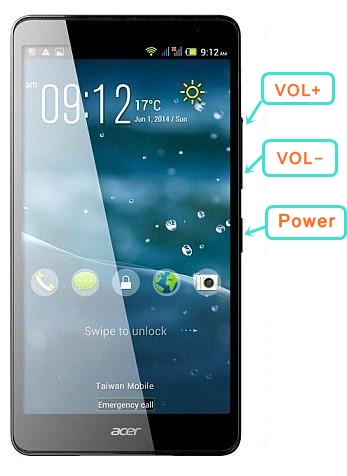
Step 4: Use VOL+ and select RECOVERY, press VOL- to confirm.
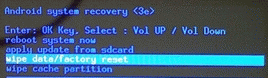
Step 5: After sometime you got ANDROID RECOVERY MODE, Use VOL- KEY select WIPE DATA/FACTORY RESET and press VOL+ KEY to confirm.
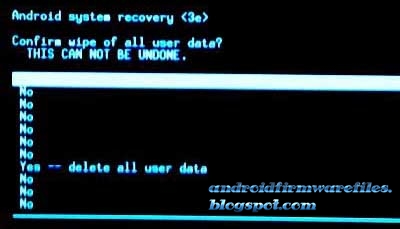
Step 6: Use VOL- KEY to select YES — DELETE ALL USER DATA and press VOL+ KEY to Confirm. (Notice: when you select Yes — delete all user data and press POWER key you lost your phone all user data)
Step 7: Wait until complete RESET YOUR PHONE, select REBOOT SYSTEM NOW and press VOL+ KEY.
Step 8: Now your Smartphone will reboot.
Step 9: Your Android Smartphone is now OK.
If you forgotten your phone pattern lock, user code or phone code. I show you how to manually hard reset Acer Liquid X1 Smartphone.
Best smartphone hard reset steps:
Step 1: First turn off your ACER LIQUID X1 Smartphone.Step 2: Release any SIM CARD AND SD CARD on your SmartPhone.
Step 3: Press and Hold VOL+ KEY, VOL- KEY and POWER KEY or 10 seconds.when you see in your mobile screen 3 MENU then release ALL Hold KEY.
Step 4: Use VOL+ and select RECOVERY, press VOL- to confirm.
Step 5: After sometime you got ANDROID RECOVERY MODE, Use VOL- KEY select WIPE DATA/FACTORY RESET and press VOL+ KEY to confirm.
Step 6: Use VOL- KEY to select YES — DELETE ALL USER DATA and press VOL+ KEY to Confirm. (Notice: when you select Yes — delete all user data and press POWER key you lost your phone all user data)
Step 7: Wait until complete RESET YOUR PHONE, select REBOOT SYSTEM NOW and press VOL+ KEY.
Step 8: Now your Smartphone will reboot.
Step 9: Your Android Smartphone is now OK.
Download Android Jelly Bean 4 1 2 stock firmware for Samsung I9070 Galaxy S Advance smartphone

Download Android Jelly Bean 4.1.2 stock firmware for Samsung I9070 Galaxy S Advance smartphone from here or here. Download previous firmware from here. Download another Samsung firmware from here.
Firmware details
Archive: SAMSUNG_I9070_4.1.2_20160304
Image: SAMSUNG_I9070_SJJL_ROM_20160304A / SAMSUNG_I9070_SJJL_ROM_20160304B
Model: Samsung I9070 Galaxy S Advance smartphone / Galaxy S II Lite
Archive file size: 763 MB
Support: NovaThor U8500
Build number: GT-I9070-user 4.1.2 JZO54K I9070ZCLPB release-keys
Caution: Please do not update firmware unless you know what you are doing, you really want it or it is absolutely necessary. Firmware updates may occasionally have bad results, like bricking your device, temporarily or permanently. The firmware update process is done entirely at your own risk. Before attempting to update the firmware, back up your data.
Don’t miss any of our future video tutorials, follow us on Youtube. Like us on Facebook. Add us in your circles on Google+. Watch our photo albums on Flickr. Subscribe now to our newsletter.
Don’t miss any of our future video tutorials, follow us on Youtube. Like us on Facebook. Add us in your circles on Google+. Watch our photo albums on Flickr. Subscribe now to our newsletter.
Download latest Android Jelly Bean 4 1 2 stock firmware for Xiaomi Mi1 Mi 1S smartphone

Download latest Android Jelly Bean 4.1.2 stock firmware for Xiaomi M1 / M1S smartphone from here or here. Download previous firmware from here.
Firmware details
Archive: MI1_M1S_4.1.2_20160114
Archive size: 322 MB
Image: MI1_M1S_SJJL_ROM_20160114YL / M1_M1S_SJJL_ROM_160115C
Image: MI1_M1S_SJJL_ROM_20160114YL / M1_M1S_SJJL_ROM_160115C
Platform: Qualcomm Snapdragon S3 MSM8260
Build number: mione_plus-user 4.1.2 JZO54K JMACNBF7.0 release-keys
Caution: Please do not update firmware unless you know what you are doing, you really want it or it is absolutely necessary. Firmware updates may occasionally have bad results, like bricking your device, temporarily or permanently. The firmware update process is done entirely at your own risk. Before attempting to update the firmware, back up your data.
Don’t miss any of our future video tutorials, follow us on Youtube. Like us on Facebook. Add us in your circles on Google+. Watch our photo albums on Flickr. Subscribe now to our newsletter.
Build number: mione_plus-user 4.1.2 JZO54K JMACNBF7.0 release-keys
Caution: Please do not update firmware unless you know what you are doing, you really want it or it is absolutely necessary. Firmware updates may occasionally have bad results, like bricking your device, temporarily or permanently. The firmware update process is done entirely at your own risk. Before attempting to update the firmware, back up your data.
Don’t miss any of our future video tutorials, follow us on Youtube. Like us on Facebook. Add us in your circles on Google+. Watch our photo albums on Flickr. Subscribe now to our newsletter.
Download Android Gingerbread 2 3 6 Stock Firmware for Lenovo A308T smartphone

Download Android Gingerbread 2.3.6 Stock Firmware for Lenovo A308T smartphone from here or here. Download previous firmware from here.
Firmware details
Update file name: Lenovo_A308t_2.3.6_20160311
Image: Lenovo_A308t_SJJL_ROM_20160311YL
Archive size: 128 MB
Platform: Mediatek MT6572
Build number: lcsh72_t_gb3-user 2.3.6 GRK39F eng.zhengbaojiang.1383200288 release-keys
Platform: Mediatek MT6572
Build number: lcsh72_t_gb3-user 2.3.6 GRK39F eng.zhengbaojiang.1383200288 release-keys
Caution: Please do not update firmware unless you know what you are doing, you really want it or it is absolutely necessary. Firmware updates may occasionally have bad results, like bricking your device, temporarily or permanently. The firmware update process is done entirely at your own risk. Before attempting to update the firmware, back up your data.
Don’t miss any of our future video tutorials, follow us on Youtube. Like us on Facebook. Add us in your circles on Google+. Watch our photo albums on Flickr. Subscribe now to our newsletter.
Don’t miss any of our future video tutorials, follow us on Youtube. Like us on Facebook. Add us in your circles on Google+. Watch our photo albums on Flickr. Subscribe now to our newsletter.
Download Android 2 3 stock firmware for Coolpad 7230 smartphone

Download Android 2.3 stock firmware for Coolpad 7230 smartphone from here or here.
Firmware details
Archive: 7230?????053??
Platform: Qualcomm MSM7227A
Archive file size: 364 MB
Model: Coolpad 7230 smartphone
Image: CP_7260_SJJL_ROM_20160315GF
Image: 2.3.053.P1.121123.7230.CPB
Inside archive: firmware + presetapp-7230.zip
Presetapp archive content: flash10.apk, BY_3RD_xianguolianbo.apk, BY_3RD_WeiXin.apk, BY_3RD_UCBrowser.apk, BY_3RD_Surfing.apk, BY_3RD_SouHuNews.apk, BY_3RD_sohutv.apk, BY_3RD_sinaWeibo.apk, BY_3RD_NetQin.apk, BY_3RD_MobileQQ.apk, BY_3RD_MobileManager.apk, BY_3RD_iReader.apk, BY_3RD_HiLeDou.apk, BY_3RD_BaiduTing.apk, BY_3RD_BaiduMap.apk & BY_3RD_AnQuanBrowser.apk
Caution: Please do not update firmware unless you know what you are doing, you really want it or it is absolutely necessary. Firmware updates may occasionally have bad results, like bricking your device, temporarily or permanently. The firmware update process is done entirely at your own risk. Before attempting to update the firmware, back up your data.
Don’t miss any of our future video tutorials, follow us on Youtube. Like us on Facebook. Add us in your circles on Google+. Watch our photo albums on Flickr. Subscribe now to our newsletter.
Download Android 2 3 5 stock firmware for Lenovo A520 smartphone

Download Android 2.3.5 stock firmware for Lenovo A520 smartphone from here or here.
Firmware details
Archive: Lenovo_A520_2.3.5_20160316
Platform: Mediatek MTK6573
Archive file size: 148 MB
Model: Lenovo A520 smartphone
Image: Lenovo_A520_SJJL_ROM_20160316GF
Build number: lenovo73_gb-user 2.3.5 GRJ90 A520_S127_120730.20120731 release-keys
Caution: Please do not update firmware unless you know what you are doing, you really want it or it is absolutely necessary. Firmware updates may occasionally have bad results, like bricking your device, temporarily or permanently. The firmware update process is done entirely at your own risk. Before attempting to update the firmware, back up your data.
Don’t miss any of our future video tutorials, follow us on Youtube. Like us on Facebook. Add us in your circles on Google+. Watch our photo albums on Flickr. Subscribe now to our newsletter.
How to Hard Reset BlackBerry Leap Smartphone
BlackBerry Leap is best smartphone in the world. This smartphone’s have high quality camera. This smartphone made by top quality BlackBerry OS. This also use top quality RAM and Processor, that’s why user smoothly use this smartphone. Pattern lock, forgotten user code and gmail lock is a common problem for smartphone. So when you buy a BlackBerry Leap smartphones you must have to know how to hard reset/factory reset. For your kind information, when you hard reset your smartphone, you must backup your all data, because after hard reset you lost your all valuable data from internal memory. Here we provide you data backup service. Every new post we try to provide top smartphones hard reset solution.
Here some Specifications of BlackBerry Leap: Li-Po 2800 mAh battery, 2G, 3G, 4G, GSM, HSPA/HSDPA, LTE network supported, Sim supported, Dual-core 1.5 GHz Krait processor, Capacitive touch-screen, 16M colors, RAM 2 GB, internal memory 16 GB, Expandable memory up to 128 GB, 5.0? display, weight 170 g, Back camera 8 MP, Front camera 2 MP, camera pixels 3264 x 2448, auto-focus, LED flash, Bluetooth v4.0, A2DP, LE, Wi-Fi 802.11, b/g/n, Hotspot, BlackBerry OS v10.3.1, Accelerometer, proximity Sensors, FM Radio, HTML5 Browser, USB supported, microUSB V2.0. If you forgotten your phone pattern lock, user code, google lock or phone code. Now I show you how to do blackberry leap hard reset.
?Related article: How to Hard Reset / Factory Reset Oppo Neo 5S
Hard Reset steps :-
Step 1 : First turn off your BlackBerry Leap Smartphone.
Step 2 : Release any SIM card and SD card on your smartphone.
Step 3 : Press and Hold Vol+ key and Power key 10 seconds.
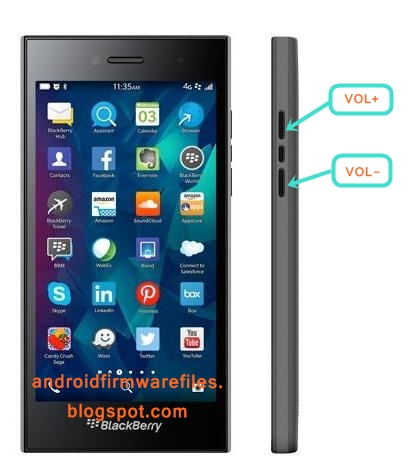
Step 4: After some time you got system recovery mode Use Vol – key select wipe data/factory reset and press Power key to confirm.
?Related article: How to Hard Reset/ Factory Reset Acer Liquid Z330
Step 5: Use Vol- key to select Yes — delete all user data and press Power key to Confirm. (Notice: when you select Yes — delete all user data and press POWER key you lost your phone all user data)
Step 6: Wait until complete reset your phone, select reboot system now and press Power key.
Step 7: Now your tablet device will reboot.
Step 8: Your Android tablet device is now OK!!
?Related article: How to Hard Reset/ Factory Reset Yezz Andy 4.5EL LTE
Factory resets steps:-
Step1: First Turn on your Lava Iris Fuel F1 Mini Device.
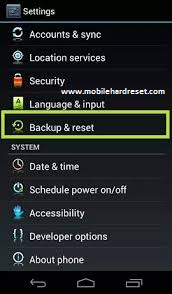
Step 2: Touch and Press Menu Button Go To Setting Menu >> Scroll and select Backup & reset >> Factory data reset >> Reset phone >> Erase everything. After factory reset, your tablet device will reboot.
?Related article: How to Hard Reset Huawei Honor 7I with Factory Reset
Download Android Jelly Bean 4 2 2 Stock Firmware for Huawei Y516 smartphone

Download Android Jelly Bean 4.2.2 Stock Firmware for Huawei Y516 smartphone from here or here. Download previous firmware from here.
Firmware details
Archives: HUAWEI_Y516_T00_SJJL_ROM_20160316GF
Image: HUAWEI_Y516_T00_SJJL_ROM_20160316GF
Archive size: 296 MB
Platform: Mediatek MT6582
Project: wt93520
Build number: Y516-T00-user 4.2.2 HUAWEIY516-T00 CHSC01B054 release-key
Platform: Mediatek MT6582
Project: wt93520
Build number: Y516-T00-user 4.2.2 HUAWEIY516-T00 CHSC01B054 release-key
Caution: Please do not update firmware unless you know what you are doing, you really want it or it is absolutely necessary. Firmware updates may occasionally have bad results, like bricking your device, temporarily or permanently. The firmware update process is done entirely at your own risk. Before attempting to update the firmware, back up your data.
Don’t miss any of our future video tutorials, follow us on Youtube. Like us on Facebook. Add us in your circles on Google+. Watch our photo albums on Flickr. Subscribe now to our newsletter.
Don’t miss any of our future video tutorials, follow us on Youtube. Like us on Facebook. Add us in your circles on Google+. Watch our photo albums on Flickr. Subscribe now to our newsletter.
Subscribe to:
Posts (Atom)