Showing posts with label wiko. Show all posts
Showing posts with label wiko. Show all posts
Friday, July 15, 2016
Download Wiko Barry Stock Rom and USB Driver
Here I have shared Android Stock Rom firmware for Wiko Barry, which is available for all countries. By installing this Stock Rom will Update your Wiko Barry, add new features and functions to Phone. Also will improve phone performance. To download Wiko Barry Stock Rom follow this link http://xdafirmware.com/support/index.php?dir=Wiko/Barry/
Wiko Barry Stock Rom Details
Supported Model : Wiko Barry
Version: 4.2.2
File Size: 367 MB
Wiko Barry USB Driver.
USB driver helps you to connect your phone with computer to transfer and recieve data. if your looking for Wiko Barry USB driver please download it here http://xdafirmware.com/drivers/Download/Wiko/Wiko_Android_USB_Driver.exe
How to flash Wiko Barry.
To flash Wiko Barry, download Firmware from provided link above then Run .exe file to start Flashing process.

Wiko Fizz and Lenny 4 2 2 Stock Rom Download
Hello, Wiko Fizz and Lenny smartphone users, if your were looking to download latest firmware for your Wiko fizz or Lenny, then this page might be helpful to you. On this page I have shared Firmware version 4.2.2 for Wiko Lenny and fizz. if your Wiko phone is not working working correctly and software if crushed, then you can use these firmwares to fix all software problem which you are facing on your Wiko fizz and Lenny. These are original stock firmware for Wiko Lenny and Fizz, you can download them using link posted at of this post. following link direct download firmware v4.2.2 for your Wiko fizz or Lenny.
Please note: always take backup of your personal data before flashing your phone.

To flash new firmware on your Wiko fizz or Lenny just download Firmware for your phone from the links provided end of this post, when download completes unzip the folder and run .exe file then follow instruction to flash your phone with new downloaded firmware. Download Firmware for Wiko Fizz
| Flash File | Link |
| Download Firmware for Wiko Fizz | Download |
| Download Firmware for Wiko | Download |
Download Wiko Birdy Stock Rom firmware flashfile and USB Driver
Wiko Birdy Stock Rom firmware flashfile and USB Driver
Wiko Birdy Stock Rom firmware
if you are searching for Android Stock Rom firmware for Wiko Barry, then you have landed on correct place, here you will find latest firmware for Wiko Birdy also USB driver to download. This firmware is available for all countries.Download Wiko Birdy Stock Rom from http://xdafirmware.com/support/index.php?dir=Wiko/Birdy/
Wiko Birdy Stock Rom Details
Supported Model : Wiko Birdy
Version: 4.4
File Size: 382 MB
Wiko Birdy USB Driver.
USB driver helps you to connect your phone with computer to transfer and recieve data. if your were looking for Wiko Birdy USB driver please download it here http://firmwarefile.com/drivers/Download/Wiko/Wiko_Android_USB_Driver.exe
How to flash Wiko Birdy.
To flash Wiko Birdy, download Firmware from from provided link above then Run .exe file and follow steps.
Thursday, July 14, 2016
How to Hard Reset Factory Reset Wiko Rainbow Jam
Wiko Rainbow Jam. It is the best smartphone’s in the worldwide market. Because ?This mobile display is high quality with this battery performance is good. And this smartphone huge popularity in time. So most user search this phone in all search engine. This mobile’s use new and latest android OS version. This mobile Wi-Fi is very strong. When you to buy this smartphone. You must have to know how to do hard reset/factory reset. For your kind information, when you do hard reset your smartphone, you must backup your all data because after hard reset you lost you’re all valuable data from internal memory. Here we provide you data backup service. Every new post we try to provide you best brand smartphones hard reset solution.
Here some Specifications of Wiko Rainbow Jam: Li-Ion 2500 mAh battery, 2G, 3G, GSM, HSPA network supported, Dual-sim supported, Quad-core 1.1 GHz Cortex-A7 processor, IPS LCD Capacitive touchscreen, 16M colors, RAM 1 GB, internal memory 8 GB, Expandable memory 64 GB, 5.0? display, weight 142.5 g, Back camera 8 MP, Front camera 5 MP, camera pixels 3264 x 2448, autofocus, LED flash, Bluetooth v4.0, A2DP, Wi-Fi 802.11 b/g/n, Wi-Fi Direct, hotspot, Android OS, v5.1 (Lollipop), Accelerometer, proximity sensors, FM Radio, HTML5 Browser, USB supported, microUSB V2.0. If you forgotten your phone pattern lock, user code, google lock or phone code. Now I show you how to do Wiko Rainbow Jam hard reset.
?Related article: How to Hard Reset Huawei Honor 7I with Factory Reset
Hard Reset steps :-
Step 1 : First turn off your Acer tablet device.
Step 2 : Release any SIM card and SD card on your smartphone.
Step 3 : Press and Hold Vol+ key and Power key 10 seconds.

Step 4: After some time you got system recovery mode Use Vol – key select wipe data/factory reset and press Power key to confirm.
?Related article: How to Hard Reset/ Factory Restore Acer Liquid Z630S
Step 5: Use Vol- key to select Yes — delete all user data and press Power key to Confirm. (Notice: when you select Yes — delete all user data and press POWER key you lost your phone all user data)
Step 6: Wait until complete reset your phone, select reboot system now and press Power key.
Step 7: Now your tablet device will reboot.
Step 8: Your Android tablet device is now OK!!
?Related article: How to Hard Reset Asus Zenfone Zoom ZX551ML
Factory resets steps:-
Step1: First Turn on your Wiko Rainbow Jam device.
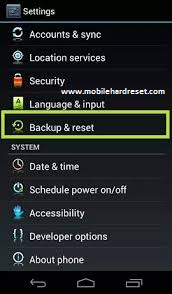
Step 2: Touch and Press Menu Button Go To Setting Menu >> Scroll and select Backup & reset >> Factory data reset >> Reset phone >> Erase everything. After factory reset, your tablet device will reboot.
?Related article: How to Hard Reset/Factory Reset Pantech Flex P8010
Subscribe to:
Posts (Atom)