Showing posts with label solution. Show all posts
Showing posts with label solution. Show all posts
Friday, July 15, 2016
Karbonn a6 Screen Lock Hard Reset Solution
(Step 1) Use miracle box
How to remove Karbonn a6+ Screen Lock with miracle box

(Step 2) Hard reset method
1: Press Power button, until your phone is off.
2: Next hold and press Volume Up + Volume Down + Power button until you see menu with 2 options.
3: From this menu choose option Recovery Mode.
Press Volume Up to enter this mode.
4: If you see Android logo on your screen, then press Power button.
5: Navigate to option "wipe data/factory reset" using Volume buttons to scroll, and Menu key + Back key to confirm.
6:Then accept this: "Yes -- delete all user data" with holding for few seconds Menu key + Back key.
7: After that confirm option "reboot".
8: Thats all.
WARNING !
Hard Reset will erase all of your data
All described operations you are doing at your own risk.

Micromax Bolt A28 Hard Reset Pattern Lock Solution by Miracle Box
How to remove Micromax A28 Pattern lock solution here
Press and Hold Vol. Down + power Button for 20-30 seconds.
Now you see "Fast boot Mode


Micromax Bolt A71 Pattern Lock Hard Reset solution
How to remove Micromax A71 Pattern Lock/ Hard Reset solution By Miracle box
Definition Applied
Connecting to Phone,Wait..ok
Hardware:sc7710g
Board:sp7710g2
CPU ABI:armeabi-v7a
Manufacturer:micromax
Model:micromax a71
Android Ver:4.1.2
bootloader ver:unknown
USB config:mass_storage,adb,vser,gser
User:yeming
Baseband ver:dm_base_13c_mp_w13.35_p20|sc7710g2_modem|rel date:12-24-2013 15:47:05
Build number:gst_a93_w853_mmx_a71_44_v19
ID:jzo54k
Region:us
Language:en
Chipset:sc7710
IMEI1:9113358+++++++
Root: Not Root
Done
Definition Applied
Connecting to Phone,Wait..ok
checking info...
Model:Micromax A71
Android Ver:4.1.2
Rooting...
ROOT OK! Reboot!
Definition Applied
Connecting to Phone,Wait..ok
Wipe data...
>>Done

Micromax ad3520 Dead Phone Recover Done Solution by Miracle Box
Micromax ad3520 Dead Phone Recover Done Solution by Miracle Box
Micromax ad3520 Pattern lock/ hard reset done

Thursday, July 14, 2016
ACER Liquid E3 Hard Reset Solution
ACER LIQUID E3. Here some Futures of ACER LIQUID E3: Non-removable Li-Ion battery, 2G, 3G, GSM, HSPA network supported, Optional Dual-sim supported, Quad-core 1.2 GHz Cortex-A7 processor, IPS LCD capacitive touchscreen, 16M colors and multitouch supported, RAM 1GB, internal memory 4GB, Expandable memory up to 32 GB(micro SD card slot ), 4.7” display, Back Camera 13MP, Front Camera 2MP, Camera pixels 4160×3120 (Autofocus LED flash), weight 1134gm, Bluetooth v4.0, Wi-Fi 802.11, Android OS, V4.2.2(Jelly Bean), Accelerometer, Proximity sensors, FM RadioTBC, HTML Browser, Micro USB V2.0.
If you forgotten your phone pattern lock, google lock or phone code. I show you ACER LIQUID E3 hard reset solution.
Your phone reset steps:
Step 1: First turn off your ACER LIQUID E3 Smartphone.
Step 2: Release any SIM CARD AND SD CARD on your SmartPhone.
Step 3: Press and Hold VOL+ KEY, VOL- KEY and POWER KEY or 10 seconds.when you see in your mobile screen 3 MENU then release ALL Hold KEY.

Step 4: Use VOL+ and select RECOVERY, press VOL- to confirm.
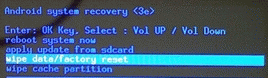
Step 5: After sometime you got ANDROID RECOVERY MODE, Use VOL- KEY select WIPE DATA/FACTORY RESET and press VOL+ KEY to confirm.
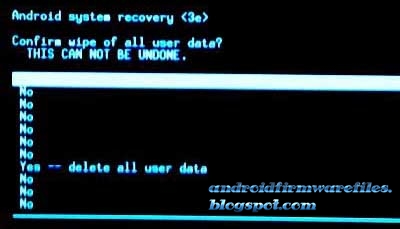
Step 6: Use VOL- KEY to select YES — DELETE ALL USER DATA and press VOL+ KEY to Confirm. (Notice: when you select Yes — delete all user data and press POWER key you lost your phone all user data)
Step 7: Wait until complete RESET YOUR PHONE, select REBOOT SYSTEM NOW and press VOL+ KEY.
Step 8: Now your Smartphone will reboot.
Step 9: Your Android Smartphone is now OK.
Step 2: Release any SIM CARD AND SD CARD on your SmartPhone.
Step 3: Press and Hold VOL+ KEY, VOL- KEY and POWER KEY or 10 seconds.when you see in your mobile screen 3 MENU then release ALL Hold KEY.
Step 4: Use VOL+ and select RECOVERY, press VOL- to confirm.
Step 5: After sometime you got ANDROID RECOVERY MODE, Use VOL- KEY select WIPE DATA/FACTORY RESET and press VOL+ KEY to confirm.
Step 6: Use VOL- KEY to select YES — DELETE ALL USER DATA and press VOL+ KEY to Confirm. (Notice: when you select Yes — delete all user data and press POWER key you lost your phone all user data)
Step 7: Wait until complete RESET YOUR PHONE, select REBOOT SYSTEM NOW and press VOL+ KEY.
Step 8: Now your Smartphone will reboot.
Step 9: Your Android Smartphone is now OK.
Lenovo A396 Google Account Lock Remove Solution

Lenovo A396 Spd Sc7730 Google Account Lock Hard Reset File Latest Flash File Download Directly For Free Without Password & Direct Download This is The Latest Version Firmware Available Latest-Setup.org It is Tested As Well As Good And Working .
Lenovo A396 Spd Sc7730 Pattern Lock Done
Download File
ResearchDownload_9005
Lenovo A396 Spd Sc7730 Pattern Lock Done
Download File
ResearchDownload_9005
Subscribe to:
Posts (Atom)